What you can do in EULER through Claude as a partner — read across your performance, commissions, deals, referrals, agreements, onboarding progress, and content, and your team's users & roles; submit referrals, feedback, and team-role management. Read areas grouped by domain, the four write surfaces, plus concepts, privacy details, and FAQs underneath.
01
Your partnership at a glance
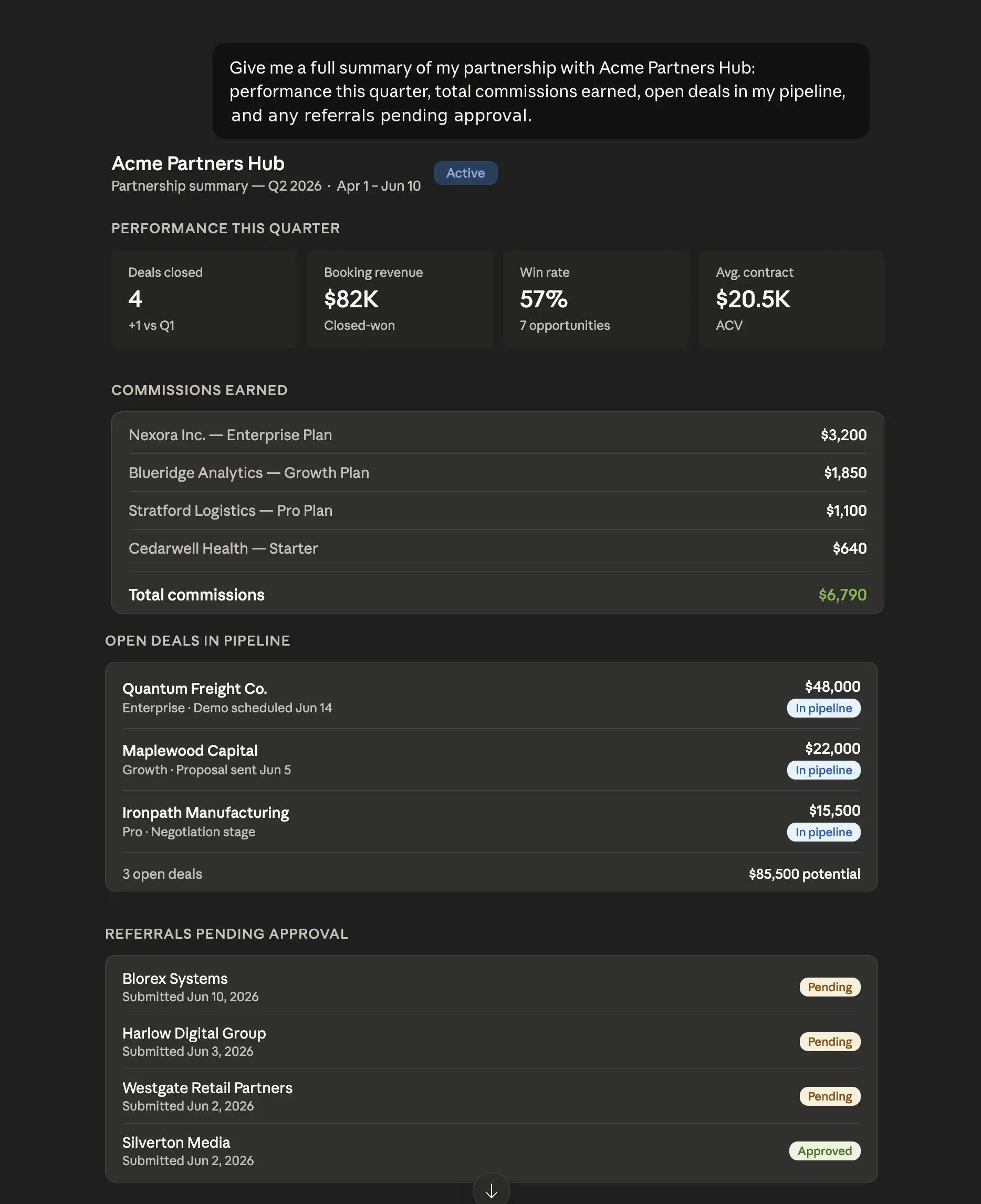
Ask for a full summary of your partnership with any customer — performance metrics for the period, commissions earned deal by deal, open pipeline, and referrals pending approval. Claude calls the relevant tools and weaves the results into one structured answer, so you walk into any meeting already briefed.
PromptGive me a full summary of my partnership with Acme Partners Hub: performance this quarter, total commissions earned, open deals in my pipeline, and any referrals pending approval.
"Give me a Q2 summary of my partnership with TechCorp."
"How am I performing this quarter at Acme — deals, commissions, pipeline?"
"What referrals are still pending approval at my main customer?"
"Compare my Q1 vs Q2 numbers at Beta Solutions."
02
Submit a referral in plain language
Writes
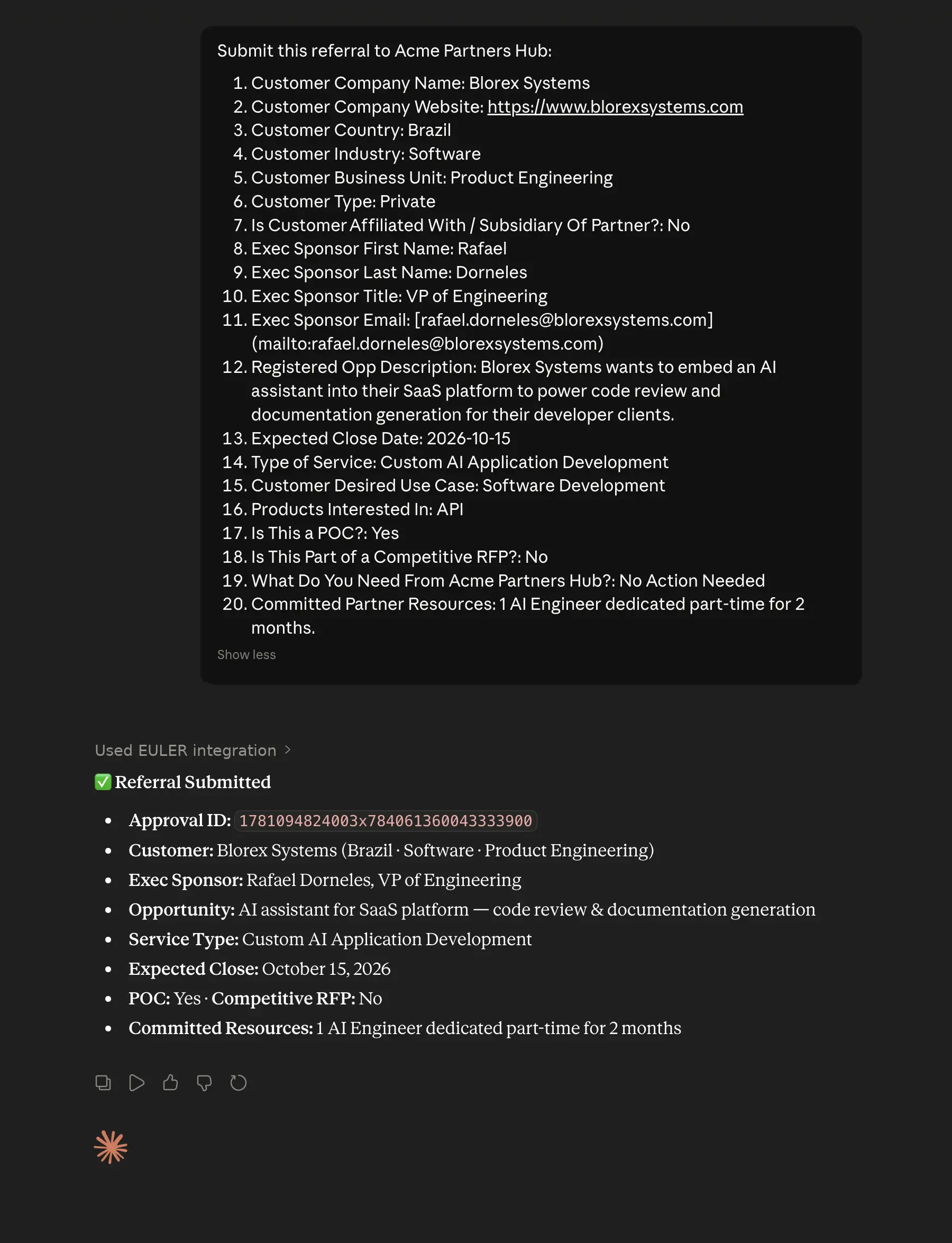
Describe the deal and the AI does the rest — it fetches your customer's referral form, validates every required field and answer format, then submits only when the payload is clean. No rejected referrals from missing fields, no orphan rows from bad input. If something is wrong, you get a precise error before any row is created.
PromptSubmit this referral to Acme Partners Hub: Customer Company Name: Blorex Systems, Customer Company Website: https://www.blorexsystems.com, Country: Brazil, Industry: Software, Type: Private, Business Unit: Product Engineering, Exec Sponsor: Rafael Dorneles, VP of Engineering, Email: rafael.dorneles@blorexsystems.com, Opportunity: AI assistant for SaaS platform — code review & documentation generation, Service: Custom AI Application Development, Expected Close: 2026-10-15, POC: Yes, Competitive RFP: No, Committed Resources: 1 AI Engineer dedicated part-time for 2 months.
Toolsreferralssubmit_referral
You can also ask
"Submit a referral to TechCorp for Nexora Inc. — $50k SaaS deal, closing Q3."
"File a deal registration for the opportunity from this email."
"Send all the referrals in this spreadsheet."_ (Claude iterates row-by-row)
"Submit a referral — here's the customer info: [paste data]."
03
Track your referrals
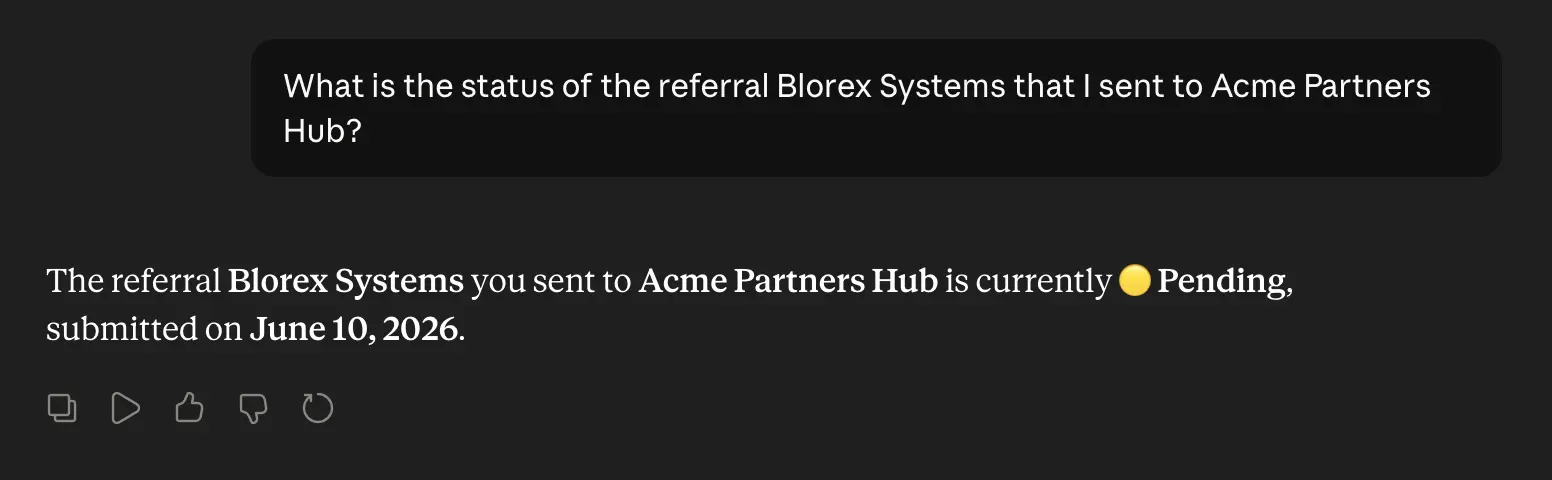
Check the status of any referral by name, filter your history by period or status, or get a full list of what you submitted to a given customer. You get the answer in one message — no navigating to the portal, no digging through tables.
PromptWhat is the status of the referral Blorex Systems that I sent to Acme Partners Hub?
Toolsreferrals
You can also ask
"What's the status of the referral I sent for Blorex Systems?"
"Show me all my pending referrals at TechCorp."
"List the deal registrations I submitted last quarter."
"Which of my referrals were approved in Q1?"
04
Content your customer shared with you
Browse every file and link your customer has shared — PDFs, decks, Word docs, images, videos, and external links — with real download URLs returned directly. Or search semantically inside the content to find the right policy, playbook, or certification doc by meaning, not filename.
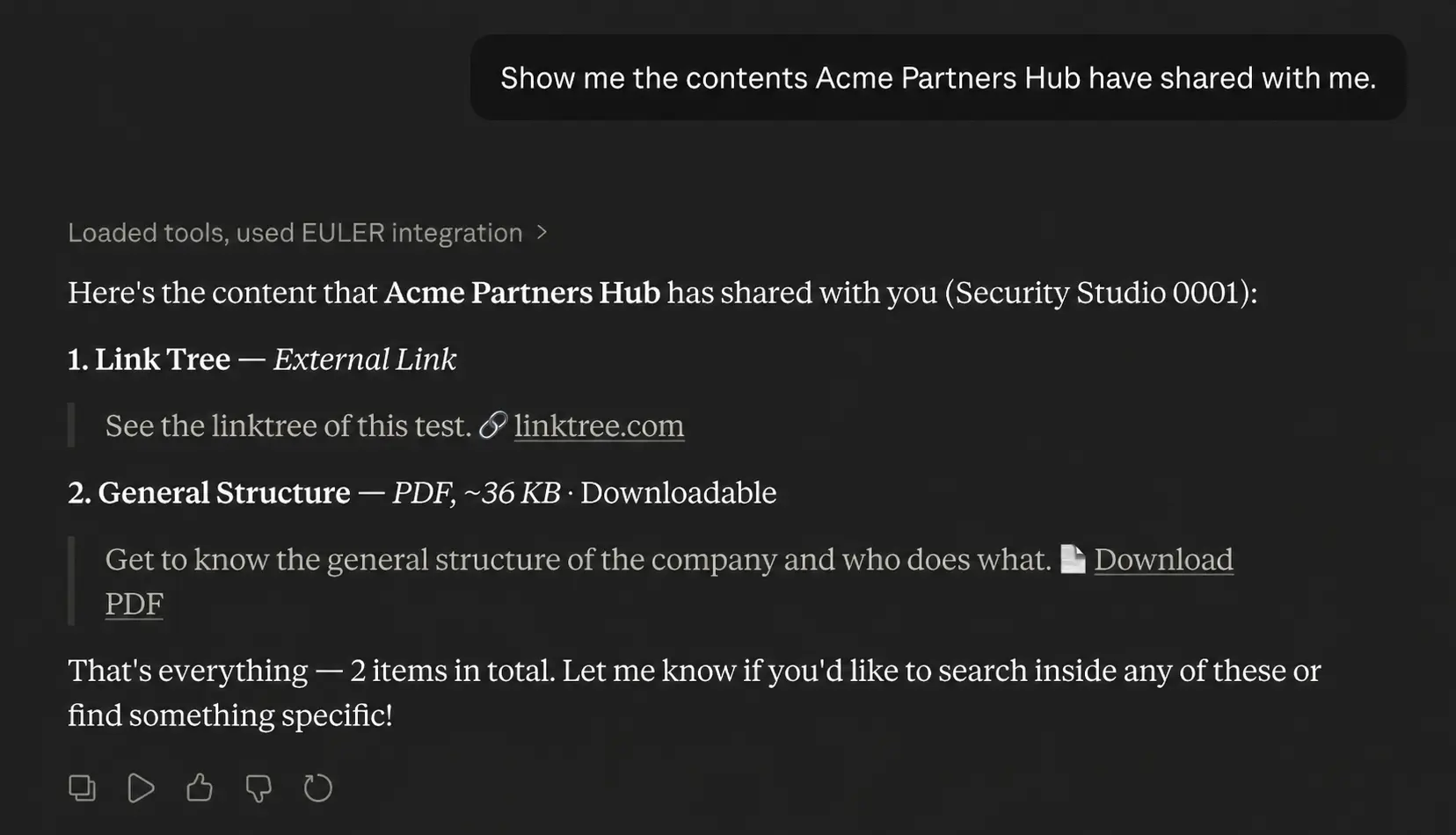
PromptShow me the contents Acme Partners Hub have shared with me.
Toolscontent_listcontent_search
You can also ask
"What content does TechCorp have available for me?"
"List the PDFs my customer shared."
"Do I have a deck about the Premier tier?"
"How do I qualify for Premier status?"
"Where's the documentation on submitting deal registrations?"
Full per-tool reference
Read access — areas the MCP can query
Eleven partner-relevant areas, all scoped to your own partnership data at each customer you're a partner of. (If you're a partner of multiple customers, the AI asks which one before answering — zero cross-contamination.)
Performance & income
Your performance metrics
Per-customer performance over any date range — deal count, booking + billings revenue, win rate, average contract value, sales cycle, partner status.
Try"How am I performing at TechCorp this quarter?"·"Compare my Q1 2026 vs Q4 2025 numbers at Acme."
See example
Example conversation
Hey, can you pull my performance at TechCorp for Q2? April through June.
Called 2 tools
list_accountsperformance
Here's your Q2 at TechCorp (Apr 1 – Jun 30):
Deals closed: 14
Revenue: $412,000
Win rate: 38%
Avg contract value: $29,400
Avg sales cycle: 47 days
Solid quarter — revenue's up on a healthy ACV.
How does that stack up against Q1?
Called 1 tool
performanceaction='partner', same partner_id, start_date=2026-01-01 end_date=2026-03-31
Q1 (Jan 1 – Mar 31) vs Q2:
Deals: 11 → 14
Revenue: $305,000 → $412,000 (+35%)
Win rate: 33% → 38%
ACV: $27,700 → $29,400
Cycle: 52 → 47 days
Growth across the board, and you're closing faster.
Of my Q2 deals, how many did I actually source vs just influence?
Called 1 tool
influenced_sourced_dealspartner_id scoped, start_date=2026-04-01 end_date=2026-06-30
Your Q2 deal attribution at TechCorp:
Sourced (you originated): 9 deals · $268,000
Influenced (you touched): 6 deals · $151,000
Both sourced & influenced: 4 deals · $122,000
Note these buckets overlap — a deal you originated and stayed on counts in both — so they don't sum to a single deal total. Sourcing is clearly your strongest lane.
Your commissions
Commissions earned within a date range, with a deal-by-deal breakdown when there's activity. Date filtering is first-class.
Try"How much commission did I earn in March?"·"Which deals contributed the most to my commission last quarter?"
See example
Example conversation
How much commission did I earn this quarter?
Called 2 tools
list_accountscommissions
For Acme, Apr 1 – Jun 30 2026 you earned $18,420 in commissions across 6 deals.
Want the deal-by-deal breakdown?
Yeah, break it down by deal
Called 1 tool
commissionsaction='partner', same Q2 window — group list_of_charges by Deal_Name
Acme commissions, Q2 2026:
Blorex Systems — $6,200
Nexora Inc — $4,800
Vertex Labs — $3,150
Orion Retail — $2,400
2 smaller deals — $1,870
Total: $18,420
What about just June?
Called 1 tool
commissionsaction='partner', Jun 1 – Jun 30 2026 window
For June 2026 (Jun 1 – Jun 30), Acme earned $5,550 across 2 deals:
Vertex Labs — $3,150
Orion Retail — $2,400
Sourced vs Influenced
Deal-attribution classification of your deals — sourced (you generated it) vs influenced (you helped close it) — with per-customer totals over a date range.
Try"How many deals did I source vs influence this quarter?"·"What's the total value of my influenced deals year-to-date?"
See example
Example conversation
How did our partners' sourced vs influenced deals stack up this quarter?
Called 1 tool
influenced_sourced_dealscompany-wide (omit partner_id), Q2 range Apr 1-Jun 30; per-partner ranking
Company-wide, Apr 1 - Jun 30:
Sourced: 22 deals, $631K
Influenced: 41 deals, $1.48M
Top by influenced value:
Acme: 11 deals, $412K
Lumon Industries: 9 deals, $355K
Beta Solutions: 7 deals, $288K
Influence value ran ~2.3x sourced across the program this quarter.
Zoom into Acme - what's their sourced vs influenced split?
Called 2 tools
list_accountsinfluenced_sourced_deals
Acme, Apr 1 - Jun 30:
Sourced: 6 deals, $184K
Influenced: 11 deals, $412K
Sourced & influenced: 3 deals, $97K
Acme influenced far more value than they originated - influenced is ~2.2x their sourced total this quarter.
Was Acme's split any different in Q1?
Called 1 tool
influenced_sourced_dealsreuse Acme partner_id, Q1 range Jan 1-Mar 31
Acme, Jan 1 - Mar 31:
Sourced: 8 deals, $246K
Influenced: 5 deals, $173K
Flipped from Q2 - in Q1 Acme sourced more than they influenced ($246K vs $173K). Their originated pipeline led last quarter; influence overtook it this one.
Your invoices & charges
Per-partnership invoices and charges, paginated. Pairs naturally with your commissions for a full revenue picture.
Try"Show me my invoices with TechCorp."·"List the charges I've received — page 1."
See example
Example conversation
Can you pull my latest invoices from my partnership at TechCorp?
Called 2 tools
list_accountspartner_artifacts
Here are the most recent invoices for your TechCorp partnership:
This is page 1 — there may be more. Want the next page, or the charges on your account?
Yes — show me the charges I've received. Page 1.
Called 1 tool
partner_artifactsaction='charges' for the same partner_id (page 1) — returns the partner's charges, paginated
Here's page 1 of the charges assigned to your TechCorp partnership:
Orion Retail deal — $2,600.00 · Approved
Nexora Inc deal — $1,750.00 · Approved
Vertex Labs deal — $750.00 · Approved
These are your partner-level charges (not filtered to a single invoice). There may be more pages — want page 2?
Which agreement do I have on file with them?
Called 1 tool
partner_artifactsaction='agreements' for the same partner_id — returns signed agreement rows
You have 1 signed agreement on file for your TechCorp partnership:
Referral Partner Agreement v2 — Status: Signed
This artifact lists the agreement record itself; the detailed commission terms inside it aren't exposed as structured data here. To review the full terms, open the agreement in your partner portal. Anything else on your billing?
Your incentive plan
Your active incentive plans at a customer — Inc 1.0 (tier package, commission tiers with rates, payout frequency) and Inc 2.0 (current tier + badge, program status, commission structure by product). Requires the partnership to have an active plan.
Try"What tier am I on at TechCorp and what are my rates?"·"Show my Inc 2.0 program status."
See example
Example conversation
What does my commission structure look like on my Inc 1.0 plan at TechCorp? I'm with Acme.
Called 2 tools
list_accountspartner_inc1_incentives
Your Acme Inc 1.0 plan — package Reseller Standard, paid quarterly, net 30 post-payment:
Bronze ($0–50k): 8% + $200 flat
Silver ($50k–150k): 12% + $500 flat
Gold ($150k+): 15% + $1,000 flat
All tiers settle net 30 days.
And my Inc 2.0 program — what tier am I at right now and how am I paid there?
Called 1 tool
partner_inc2_incentivesaction='status' for Acme (reuse id); read tier_name/tier_badge, program_name/status, payout_frequency, commission_structure[], benefits[]
On Partner Growth 2.0 (status: active), you're Silver 🥈, paid monthly. Commission by product group:
Core Platform $0–100k: 10% + $150 demo payout
Add-ons (all products) $0–∞: 14%
Tier benefit: dedicated partner manager = Yes, net 45 days.
What do I need to hit to reach the next tier?
Called 1 tool
partner_inc2_incentivesaction='progression' for Acme; read next_tier_name, then filter live_metrics[] by tier_name===next_tier_name
Next tier is Gold 🥇 (you're Silver). Live progress on the Gold rules:
Closed revenue (12mo): $118k / $150k — not yet met
Won deals (12mo): 9 / 8 — met
Certified users: 3 / 5 — not yet met
Revenue and certs are the two gaps to Gold.
Is there any temporary boost or campaign running on my Inc 2.0 right now?
No tier override is in effect, so your base Silver rates otherwise stand. It expires end of Q3.
Pipeline
Your deals & pipeline
Full list of deals linked to you at a given customer — name, stage, amount. Paginated; all-time by default (use Performance metrics for period-scoped totals).
Try"List my deals at TechCorp — page 1, 20 per page."·"Find my deal named 'TechFlow renewal'."
See example
Example conversation
Pull up all my deals at TechCorp — I want to see where my pipeline stands.
Called 2 tools
list_accountspartner_artifacts
Here's your pipeline at TechCorp (page 1 of 2, 14 deals):
Blorex Systems — Negotiation — $84,000
Nexora Inc — Proposal — $52,500
Vertex Labs — Closed Won — $120,000
Orion Retail — Discovery — $31,000
Open pipeline: $298k across 11 deals. Want page 2?
What's the latest on the Blorex Systems deal specifically?
Called 1 tool
get_search_dealsdeal_name='Blorex', partner_id set (required for partner-role; scope 'both')
Blorex Systems
Stage: Negotiation
Amount: $84,000
Created: 2026-04-12 • Close date: 2026-08-30
CRM ID: BLX-4471
It's your largest open deal. Want to see the charges or commissions tied to it?
Nothing booked on Blorex yet — charges land once it closes. Want the invoice view?
And how much commission have I actually earned on these so far?
Called 1 tool
commissionsaction='partner', partner_id set, start_date/end_date = last 90 days
Your commissions at TechCorp (last 90 days):
Vertex Labs — $2,700 earned (paid)
Vertex Labs — $1,200 (pending, on the $6k charge)
Nexora Inc — $525 (pending)
Total: $4,425, of which $2,700 is paid. Blorex earns commission once it closes. Want the payout dates?
Your referrals & deal registrations
Search across all your referrals with filters (status, type, date range), or list all referrals you submitted to a given customer.
Try"What's the status of the referrals I submitted in Q1?"·"Show me the deal registrations I sent last quarter."
See example
Example conversation
Show me all the referrals and deal regs I've submitted through Acme.
Called 2 tools
list_accountsreferrals
You have 7 submissions via Acme (referrals and deal regs combined):
Blorex Systems — approved
Nexora Inc — pending
Vertex Labs — approved
Orion Retail — rejected
…plus 3 more (2 approved, 1 pending). Want me to narrow to a status, or open one's submitted answers?
Just the pending ones from the last 60 days.
Called 1 tool
referralsaction='for_partner', partner_id=Acme; filter to Status='pending' and submitted_on within 60 days client-side
2 pending in the last 60 days:
Nexora Inc — submitted Jun 18, awaiting review
Halcyon Group — submitted May 29, awaiting review
Nexora is the oldest still in queue at ~21 days. Want the answers you submitted on either?
Yeah, pull up what I filled in on the Nexora referral.
Called 1 tool
referralsaction='get_answers', approval_id=Nexora (from the prior for_partner record)
Your submitted answers for Nexora Inc:
Contact: jordan.lee@example.com
Deal size: $50k–100k
Timeline: This quarter
Use case: Migrating off a legacy CRM
Competitor: None identified
That's every answer on file for this one. Want me to check another submission?
And do I have anything submitted through Beta Solutions too?
Called 2 tools
list_accountsreferrals
Via Beta Solutions you have 2 submissions:
Meridian Freight — approved
Cobalt Analytics — duplicate found (matched an existing record)
The Cobalt one flagged as a duplicate is worth a look — want its submitted answers?
Documents
Your agreements
Signed agreements per customer — name, status, signed date. Useful for renewals and audits.
Try"List all the agreements I have with TechCorp."·"What's the status of my master agreement with TechCorp?"
See example
Example conversation
Show me the agreements I've signed with TechCorp
Called 2 tools
list_accountspartner_artifacts
You have 3 agreements with TechCorp (as Acme):
Partner Reseller Agreement — Signed, 2026-01-14
Data Processing Addendum — Signed, 2026-01-14
2026 Commission Schedule — Pending signature
Two are fully signed; the Commission Schedule still needs your countersignature.
What tracking links do I have set up?
Called 1 tool
partner_artifactsaction='tracking_links' for partner_id
You have 2 active tracking links:
Homepage – Q1 Campaign — .../go/a1B2c3
Free Trial – Webinar — .../go/X9y8Z7
Both route through TechCorp's site with your affiliate id attached.
And any invoices raised against my partnership?
Called 1 tool
partner_artifactsaction='invoices' for partner_id
2 invoices on file:
INV-2041 — $4,200 — Paid, 2026-03-31
INV-2088 — $1,850 — Outstanding, due 2026-04-30
INV-2088 covers Q1 referral commissions and is still open.
Content library & knowledge base
Two ways to reach the content your customer shares with you. BROWSE your library — list every file and link you can access (PDFs, decks, Word docs, images, uploaded videos, plus YouTube / Vimeo / Loom / Drive links), newest first or filtered by name, with the real download URLs returned. Or SEARCH inside it semantically — ask in your own words and get the right doc by meaning, not filename.
Try"What content do I have access to? List the PDFs my customer shared with me."·"Do I have a deck about the Premier tier?"·"Where's the documentation on submitting deal registrations?"·"How do I qualify for Premier tier?"
See example
Example conversation
What content has TechCorp shared with me in the portal? I'm at Acme.
Called 2 tools
list_accountscontent_list
TechCorp has shared 9 items with Acme. The 5 newest:
Q3 Partner Deck (PDF, 4.2 MB)
Product One-Pager (PDF, 1.1 MB)
Pricing & Packaging (Word doc)
Demo Walkthrough (Loom link)
Brand Assets (image bundle)
Plus 4 more, including a Security & Compliance Overview, SOC 2 FAQ, and Admin Setup Guide. Want the full list?
Do I have anything specifically about security or compliance?
Called 1 tool
content_listquery='security' name-substring filter, reuse Acme partner_id
The Admin Setup Guide is your best walkthrough. Want its link?
How do I actually download that Admin Setup Guide from the portal?
Called 1 tool
euler_helpEULER product how-to search (help center)
That's an EULER product question, so from the help center: Downloading shared content: open Portal → Content Library, click the file card, then Download (available when the item is marked downloadable). External links (Loom/Drive) open in a new tab instead. Source: support.eulerapp.com/content-library
Service projects — SI partners
Your service projects
Your System Integrator service projects, end to end: list them with their status, approval, and dates; open any one for its full detail; or pull up a project's scope form to see every scoping question and the answers captured so far. You can also browse the catalog of services you're cleared to add. SI is opt-in — if this comes back empty, your customer likely hasn't switched it on for you yet, rather than there being nothing to show.
Try"What service projects do I have, and where do they stand?"·"Open my 'Acme rollout' project — dates and approval status?"·"Show the scope form for that project and what's answered so far."
See example
Example conversation
What service projects do I have at Aether Dynamics?
Called 2 tools
list_accountssi_service_projects
You have 3 service projects at Aether Dynamics:
Blorex Migration
Nexora Onboarding
Vertex Labs Rollout
The list only shows names — open any one and I'll pull its status, approval, dates, and services.
Yeah, open the Blorex Migration one
Called 1 tool
si_service_projectsaction='get' with project_id
Blorex Migration
Status: In Progress
Approval: Approved 2026-06-18
Start: 2026-06-20 · Target end: 2026-09-30
Services: Data Migration, Integration Setup
What's in its scope form so far?
Called 1 tool
si_service_projectsaction='scope_form' with project_id
Blorex Migration — scope form
Environment (Dropdown): Production
Records to migrate (Number): 250,000
Go-live date (Date): 2026-09-15
Data sources (Multi-select): CRM, ERP
Checkboxes: Discovery 100%, Build 40%. This is read-only here.
Which services could I add to a new project?
Called 1 tool
si_service_projectsaction='list_services' for partner_id (customer company resolved server-side)
Services you can add at Aether Dynamics:
Data Migration
Integration Setup
Security Review
Admin Training
Managed Support
Each brings its own scope-form fields when added to a project.
Your team
Your team's users & roles
See your own organisation's people and the permission roles you've set up — your team members with their roles, your role definitions (admin flag, which portal sections each role sees), and the roles new members are auto-assigned by default.
Try"List my team and what roles each person has."·"What permission roles do we have set up?"
See example
Example conversation
Who on my team at Acme actually has a login to the partner portal right now?
Note: this is only logged-in users. Your full roster (contacts who never signed in) is larger — I can pull that too.
What permission roles do we have set up, and how many people are in each?
Called 1 tool
partner_usersaction='list_roles' for Acme
Acme has 4 roles (users assigned):
Partner Admin — Partnerships, admin, all sections · 2
Sales Lead — Sales · 9
Marketing — Marketing · 5
Finance Viewer — Finance · 1
Counts include all contacts holding each role, not just logged-in users — so totals run higher than the 3 above.
Create a 'Deal Registrant' role under Sales that can only see the deals and referrals sections.
Called 1 tool
manage_partner_usersaction='create_role', category Sales
Done — created Deal Registrant for Acme:
Category: Sales
Admin permissions: No
Sections: deals, referrals only
0 members assigned yet. Want me to assign it to anyone, or make it a default for new members?
Yes, assign it to jordan.lee@example.com and add it on top of their current roles.
Called 1 tool
manage_partner_usersaction='assign_roles', keep_old_roles=true
Assigned Deal Registrant to jordan.lee@example.com, added on top of their current roles (kept the old ones). Heads up: this only lands if Jordan is already an Acme contact — an unrecognized email is silently skipped with no error, so I can't confirm the match from this call. Want me to pull your contact roster to verify it stuck?
Write access — areas the MCP can create / edit
Four partner-facing write surfaces. They all run through the same validation + rate-limit pipeline as reads, with extra pre-flight checks so you never end up with rejected referrals.
Submit
Submit a referral
Describe a referral in plain language. The AI fetches your customer's form schema, validates required fields + answer formats, and dispatches only when the payload is clean. Bad input is rejected before any row lands in the customer's CRM.
Try"Submit a referral to TechCorp for Acme — $50k SaaS deal, expected close in Q3."·"Submit all the referrals in this spreadsheet."
See example
Example conversation
I want to refer a lead to Acme — Blorex Systems, a mid-market prospect looking at their analytics suite. Contact is Dana Reyes, dana.reyes@example.com.
Called 2 tools
list_accountsreferrals
Pulled Acme's referral form. Got most of it from your note, but two required fields are missing:
Called 1 tool
submit_referraldispatch with validated answers array
Validated and submitted to Acme.
Prospect: Blorex Systems
Contact: Dana Reyes (dana.reyes@example.com)
Stage: Evaluation - Size: $60,000
Status: Pending review. You'll be notified when Acme approves it.
Good. What other referrals do I have open with Acme right now?
Called 1 tool
referralsaction='for_partner', Acme partner_id
You have 3 referrals with Acme:
Blorex Systems - Pending (today)
Nexora Inc - Approved (Jun 28)
Vertex Labs - Pending (Jun 30)
Want me to open the details on any of these?
Yeah, show me exactly what I submitted for Vertex Labs.
Called 1 tool
referralsaction='get_answers' by approval_id
Your Vertex Labs submission:
Contact: Sam Okafor (sam.okafor@example.com)
Deal stage: Discovery
Estimated size: $25,000
Notes: Referred from a webinar; evaluating reporting add-on.
Still pending Acme's review.
Send feedback
Tell EULER engineering when something doesn't work or you wish a tool did X. Lands in the engineering Slack with your conversation context.
Try"This tool returned weird data — send feedback to EULER."·"I wish I could filter deals by source — send that as a feature request."
See example
Example conversation
The commissions tool just gave me an error I can't get past — can you flag it to your team?
Called 1 tool
submit_feedbacktype='error', affected_tool=commissions
Reported to EULER engineering. Type: error Summary: commissions returns unrecoverable 500 for a valid partner Tool: commissions I included the context: you're at Acme, the period you tried (Q2 2026), and that it still failed after a retry. It's now in the Slack channel our engineers monitor for these reports.
While you're at it — I really wish I could export my referrals to CSV. That's not a thing yet, right?
Called 1 tool
submit_feedbacktype='feature_request', affected_tool=referrals (no CSV-export action exists on referrals); user_intent captured verbatim
Correct, there's no CSV export today. Logged it as a feature request. Type: feature_request Summary: Add CSV export for referrals list Tool: referrals Intent: "pull my referrals into a spreadsheet for my weekly report" Sent to engineering.
One more: in my artifacts view, "charges" and "invoices" sound like the same thing — pass that along as a suggestion.
Called 1 tool
submit_feedbacktype='recommendation', affected_tool=partner_artifacts
Passed along as a recommendation. Type: recommendation Summary: partner_artifacts action labels "charges" vs "invoices" read as interchangeable Tool: partner_artifacts Details: When pulling my artifacts, "charges" and "invoices" sound like the same thing — suggest clearer labels or a hint on how they differ. Thanks Acme — all three are now with the EULER team.
Service projects — SI partners
Manage your service projects
Run your service projects from chat. Spin up a new one — name, dates, and the services it covers (your customer company is filled in automatically from your partnership) — then keep it moving: update its name, dates, or linked deal, fill in scope-form answers, mark checklist progress as work gets done, or remove a project you no longer need.
Try"Create a service project 'TechCorp migration' — 8 weeks, onboarding + integration services."·"Submit the scope-form answers for my Acme project."·"Mark the integration checklist 80% done and push the end date to end of Q3."
See example
Example conversation
Kick off a new SI service project for us at Acme — a cloud migration for Blorex Systems, running Aug 15 through Nov 30.
Called 3 tools
list_accountssi_service_projectssi_manage_service_project
Created Blorex Systems — Cloud Migration under Acme.
Services: Cloud Migration Assessment, Data Migration
Runs Aug 15 → Nov 30, 2026
No deal linked yet — status and approval get derived server-side once one is
Scope-form fields are being generated now — give it a few seconds, then I can help you fill them in.
Great. What does the scope form ask, and can you set the target platform to AWS and the estimated seats to 500?
Called 2 tools
si_service_projectssi_manage_service_project
Scope form has 6 fields. I filled two:
Target Platform (Dropdown) → AWS
Estimated Seats (Number) → 500
Both writes are scheduled. Still open: Migration Window, Data Sources, Compliance Scope, Primary Contact. Want me to knock those out next?
Mark the discovery workshop checklist item as 100% done.
Called 1 tool
si_manage_service_projectaction='set_progress' 100%
Done — Discovery Workshop is now marked 100% complete. The Cloud Migration Assessment section is progressing nicely; the next open sub-item is Environment Audit at 0%.
Client pushed the kickoff — move the end date out to Dec 31 and rename it to "Blorex Cloud Migration — Phase 1".
Called 1 tool
si_manage_service_projectaction='update' name + end_date
Updated the project:
Name → Blorex Cloud Migration — Phase 1
End date → Dec 31, 2026
Start date and services are unchanged. Everything else on the project stays as-is.
Your team
Manage your team's roles
Set up your own organisation's portal access — create or edit permission roles (admin flag, which sections each role sees), assign or remove roles for your team members by email, and choose which roles new members get by default.
Try"Create a 'Sales' role with deals + referrals access."·"Assign the Marketing role to tom@ourco.com."
See example
Example conversation
I'm the admin at Acme. Show me our current partner roles, then create a new "Deal Desk" role under Sales.
Called 3 tools
list_accountspartner_usersmanage_partner_users
Acme's current roles:
Admin (Partnerships) — 3 assigned
Sales Rep (Sales) — 11 assigned
Marketing (Marketing) — 4 assigned
Created Deal Desk (Sales), no admin permissions, 0 members yet. Want me to assign it to anyone?
Yes, assign Deal Desk to priya@example.com and jordan@example.com, but keep their existing roles.
Called 2 tools
partner_usersmanage_partner_users
Both are on Acme's team with the Sales Rep role, so I added Deal Desk on top and kept their existing roles:
priya@example.com — Sales Rep + Deal Desk
jordan@example.com — Sales Rep + Deal Desk
Deal Desk now shows 2 members assigned.
Actually Deal Desk should see the deals and referrals sections. Update it.
Called 1 tool
manage_partner_usersaction='edit_role', role_id=Deal Desk, default_sections=['deals','referrals']
Updated Deal Desk — it can now see the deals and referrals portal sections. Title, category (Sales) and admin setting (off) are unchanged, and the 2 assigned members inherit the new access.
Great. Make Sales Rep and Deal Desk the default roles for new Acme members.
Called 1 tool
manage_partner_usersaction='update_default_roles', role_ids=[Sales Rep, Deal Desk]
Done. New members joining Acme will now be auto-assigned Sales Rep and Deal Desk on their first login. This replaces any previous default. Existing members are unaffected — want me to confirm the current defaults?
Key concepts
Sourced vs Influenced deals
Sourced — a deal that wouldn't exist without you. You generated the lead.
Influenced — a deal that existed independently but you contributed to closing.
Partners get attributed (and often paid) differently for each. Ask: "What's the split of my deals — sourced vs influenced — this year?"
Commission timing
Commissions move through states: earned (deal triggers commission) → pending (within the customer's pay period) → paid (transferred). Ask: "Show me commissions earned but not yet paid."
Multi-customer partners
If you're a partner of more than one customer, the AI asks which one before each query. Or you can be explicit: "At TechCorp, show me my pipeline." vs "At Acme, show me my pipeline." — no cross-contamination, ever.
Connect
MCP URL: https://mcp.eulerapp.com/mcp
Easiest path: open https://claude.ai/directory/connectors/euler and click Add. For Claude Desktop or as a custom connector, paste the URL above into Settings → Connectors → "Add custom connector".
Step 1 — Add the connector. Paste the URL into Claude (or open the Directory link above and click Add).
Step 2 — Authorize. Click "Connect" — you'll be sent to the EULER consent screen, log in if you aren't already.
Step 3 — Pick your accounts. You'll see every partnership you have access to. Tick the ones you want the AI to act on. (You can change this later by disconnecting and reconnecting.) Done.
Smoke test: ask Claude "list my EULER accounts" — it should respond with the customer(s) you authorized.
Privacy & scope
Your data only. The AI never sees data of partners you're not — your view is the same as your PAM portal view, no broader.
Customer-side data is invisible to you. You can see your own deals, commissions, referrals. You cannot see other partners' performance, the customer's company-wide commission spend, or the customer's internal flows. The MCP enforces this at every call — a partner-scope token cannot promote itself to customer-scope.
Consent is per-account. If you're a partner of TechCorp AND Acme, you tick which one(s) the AI may act on at consent time.
OAuth 2.1 with PKCE. Industry-standard authentication. EULER doesn't share your password with Claude; only an opaque access token, scoped to the accounts you approved.
You can disconnect any time. Disconnect from inside Claude OR from the "Disconnect MCP" button in your EULER portal. Disconnecting revokes the token immediately.
No data leaves your customer's tenant. Calls go Claude → EULER worker → customer's EULER instance → your data. Claude sees only the response you're authorized to see.
Audited and trusted. EULER undergoes regular security reviews and publishes its Trust Center at https://trust.eulerapp.com. The MCP connector inherits the same security posture as your main EULER account.
Frequently asked questions
Q: Does this cost me anything?
No. EULER MCP is included with your partnership at no additional cost. Your Claude subscription has its own pricing — but the EULER side is free.
Q: I'm a partner of 5 different customers. Does Claude mix data across them?
No. The MCP isolates per-customer. When you ask "show me my deals", Claude asks which customer you mean (unless you already specified), then queries that one in isolation. Zero cross-contamination, ever.
Q: Can I use this on mobile?
Yes — works wherever Claude works. Claude.ai on mobile web, Claude Desktop on iPad. Same URL, same OAuth flow.
Q: What if a tool returns weird data or errors?
Tell the AI "send feedback to EULER about this" — it dispatches a structured feedback message to the EULER engineering team with your conversation context. Or email help@eulerapp.com.
Q: What if I authorize a partner account at consent, then later want to add another?
Disconnect and reconnect. The consent screen will show every partnership you have access to — re-tick the ones you want (including the new ones).
Q: I want to submit a feature request — what's missing?
Two paths: inside the chat say "submit feedback: I wish I could do X", or email help@eulerapp.com. Both land with the engineering team.