What the EULER MCP server can do today. Below are five common categories of question the MCP opens up, each shown with example prompts and one real conversation in Claude. The full per-tool reference follows underneath.
01
Single-partner deep-dive
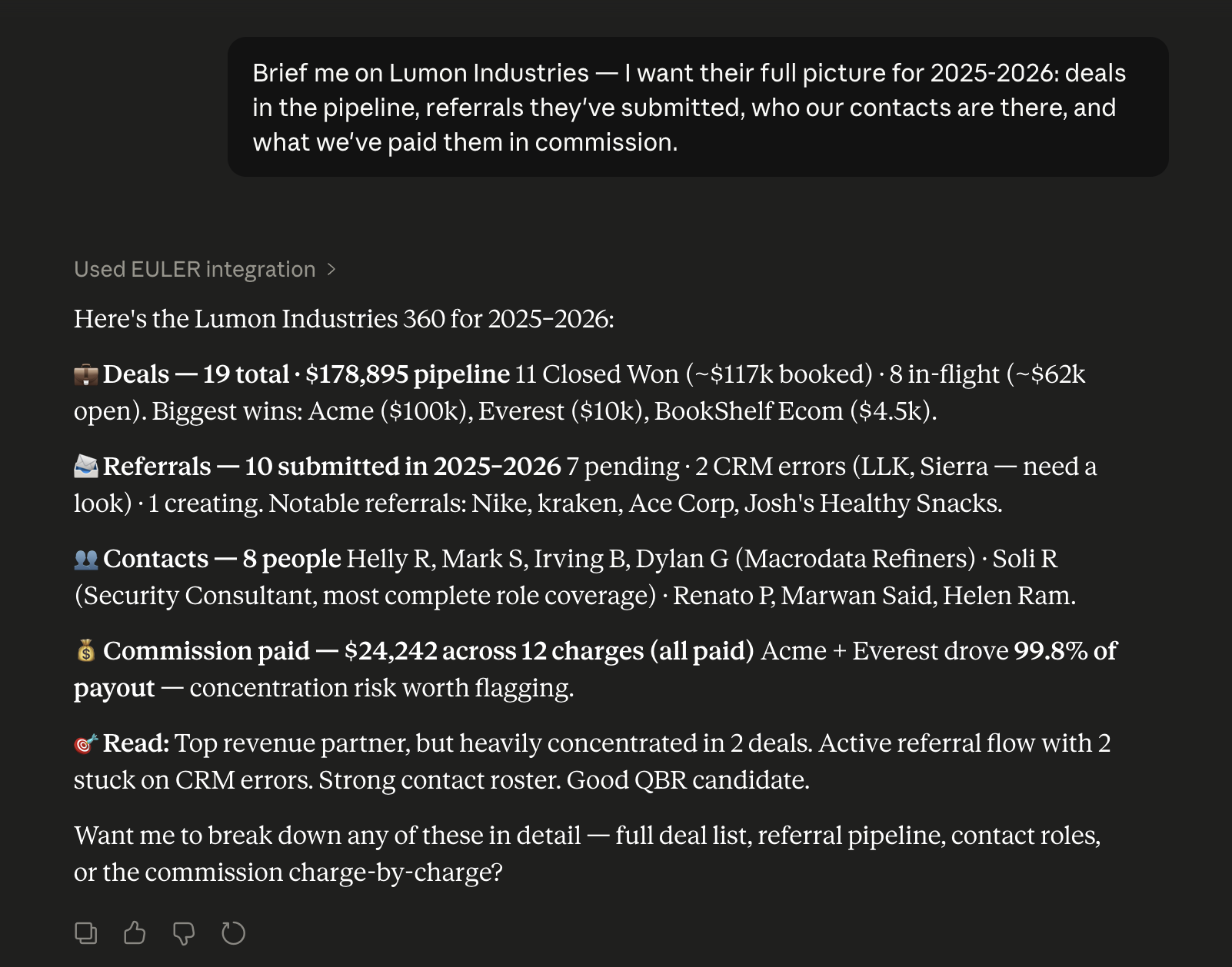
Ask anything that spans a partner's full record — performance over a period, deals in the pipeline, referral activity, contacts, and commissions paid. The MCP exposes each domain as a separate tool; Claude calls whichever ones the question needs and weaves the results into a single answer.
PromptBrief me on Lumon Industries — I want their full picture for 2025-2026: deals in the pipeline, referrals they've submitted, who our contacts are there, and what we've paid them in commission.
"Tell me everything about Lumon — pipeline, signed deals, payouts to date."
"Give me a Q1 brief on Beta Solutions, including their contacts."
"What's the full picture on Crestline over the last 90 days?"
02
Rankings and aggregations
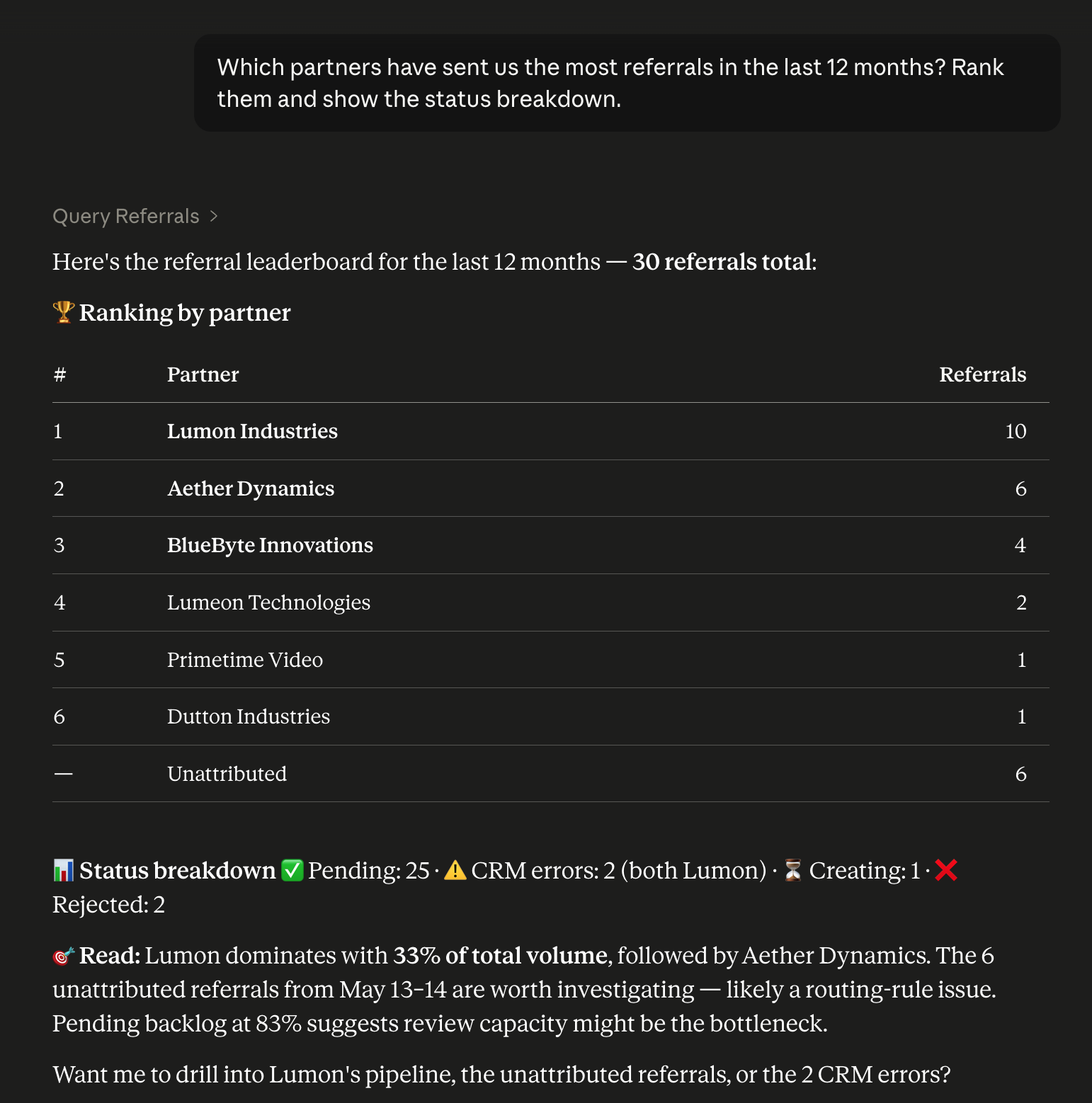
Leaderboards, counts, and grouped breakdowns across the whole program. Any axis — revenue, deal count, referral volume, commission paid — over any time window. Because the same call returns the underlying records, anomalies surface inside the same answer instead of needing a separate query.
PromptWhich partners have sent us the most referrals in the last 12 months? Rank them and show the status breakdown.
Toolsreferrals
You can also ask
"Top 10 partners by revenue this quarter."
"Which partners sent the most referrals in the last 90 days?"
"Bottom 5 by deal volume in 2026 — who's gone quiet?"
"Sourced vs influenced split for Q1, by partner."
03
Financial queries
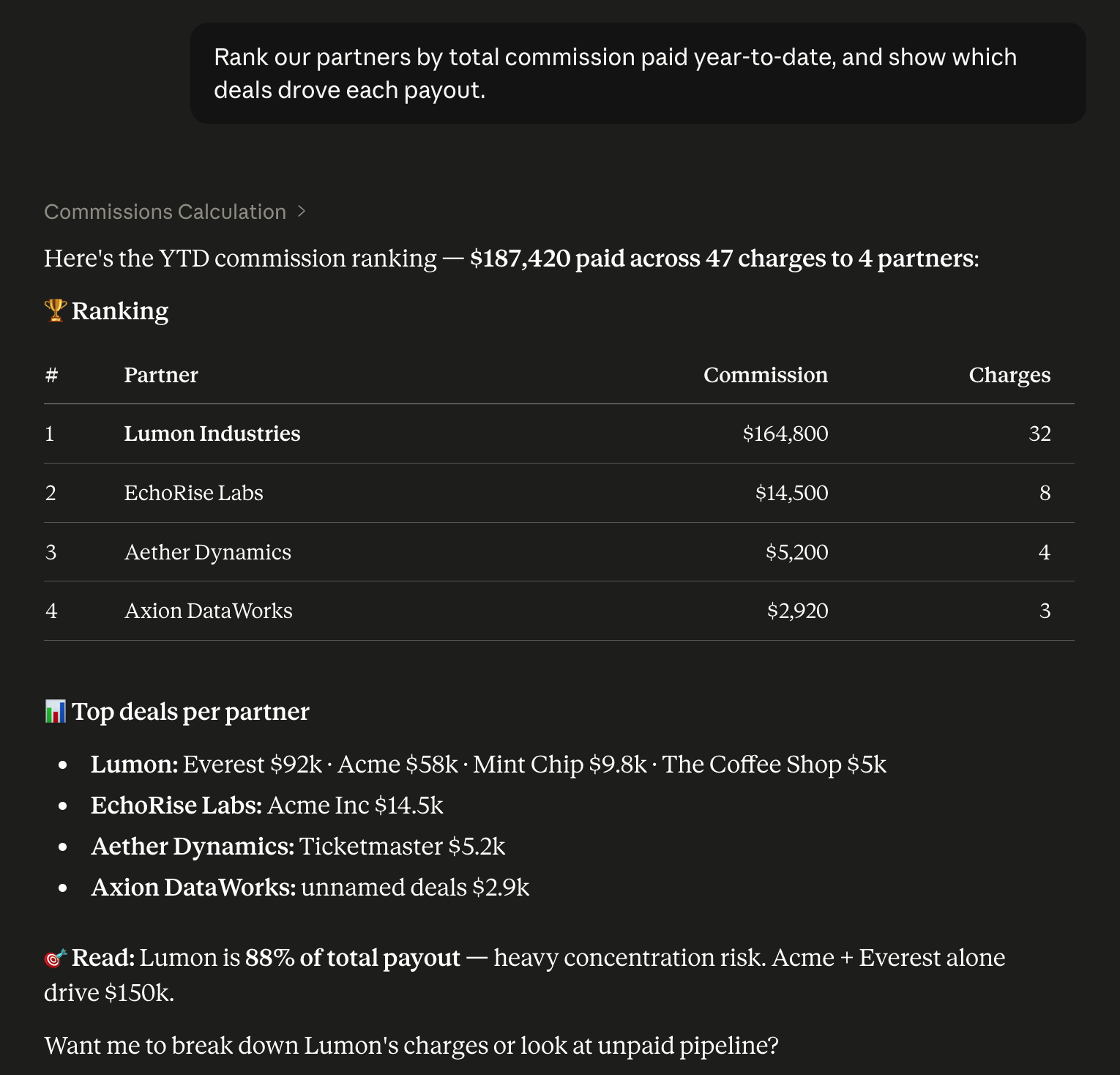
Commissions, charges, and invoices are first-class read surfaces. Slice by partner, date range, status, or currency. Ask for totals, breakdowns, concentration patterns, or unpaid pipeline. The shape that answers 'who got paid' also answers 'who's owed,' 'what's pending,' or 'which deals drove the bill.'
PromptRank our partners by total commission paid year-to-date, and show which deals drove each payout.
Toolscommissionscharges_lookup
You can also ask
"How much did we pay in commissions in April?"
"Unpaid invoices over $10k, sorted by due date."
"Total commission expense YTD per partner."
"Look up this charge — why was it created?"
"Pending invoices for Acme."
04
Directory search
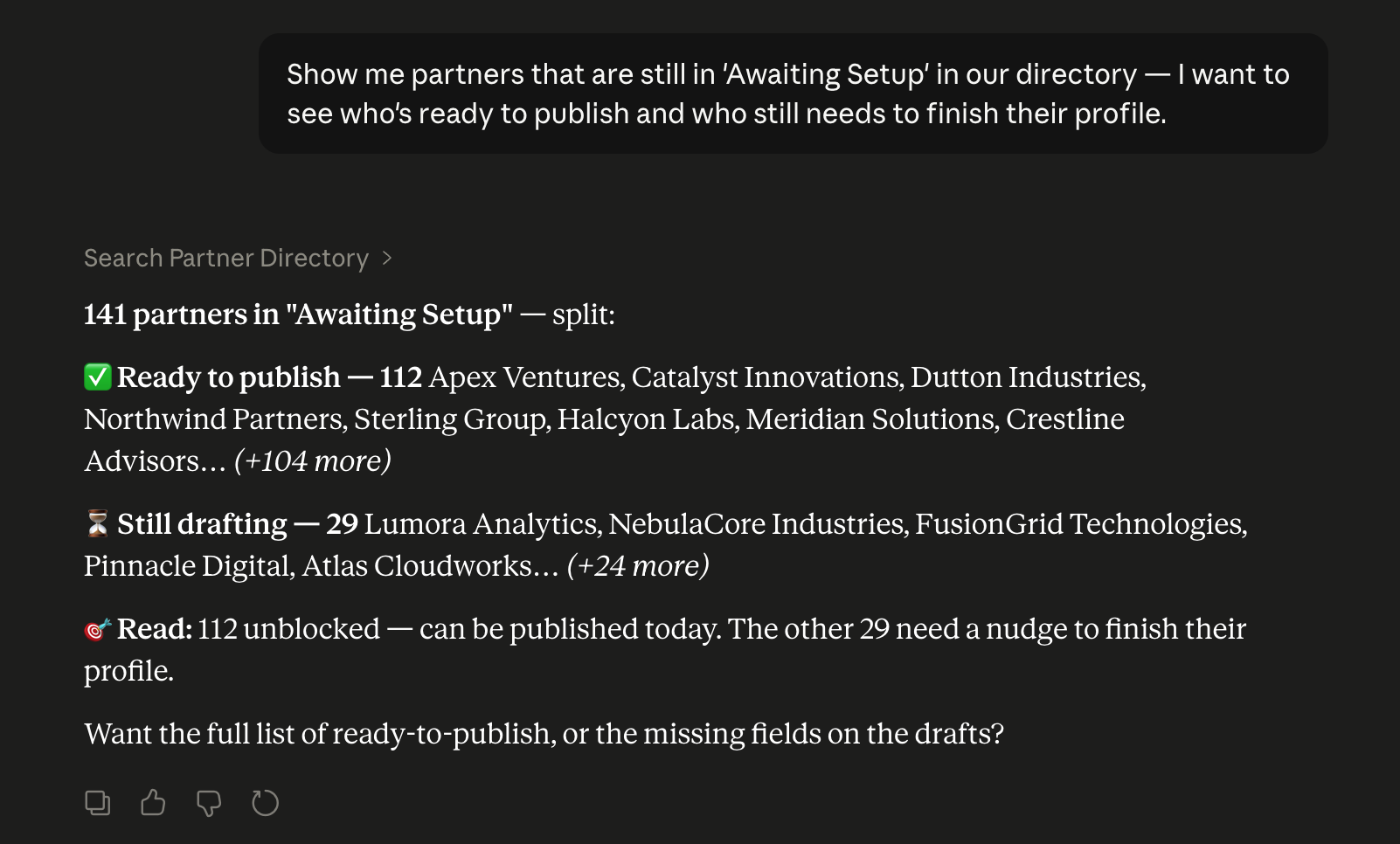
Search the partner directory by any combination of attributes — name, status, tier, type, language, website, region, profile completeness, signup date, featured flag. Claude can also split the result set into actionable groups (here: ready-to-publish vs still-drafting) without the buckets being defined up front.
PromptShow me partners that are still in 'Awaiting Setup' in our directory — I want to see who's ready to publish and who still needs to finish their profile.
Toolspartner_directory_search
You can also ask
"Which partners serve Spanish?"
"Premier-tier partners with incomplete profiles."
"Featured partners with a website set."
"Partners added in the last 30 days, by region."
"Status 'pending approval' — who's waiting on us?"
05
Write actions
Writes
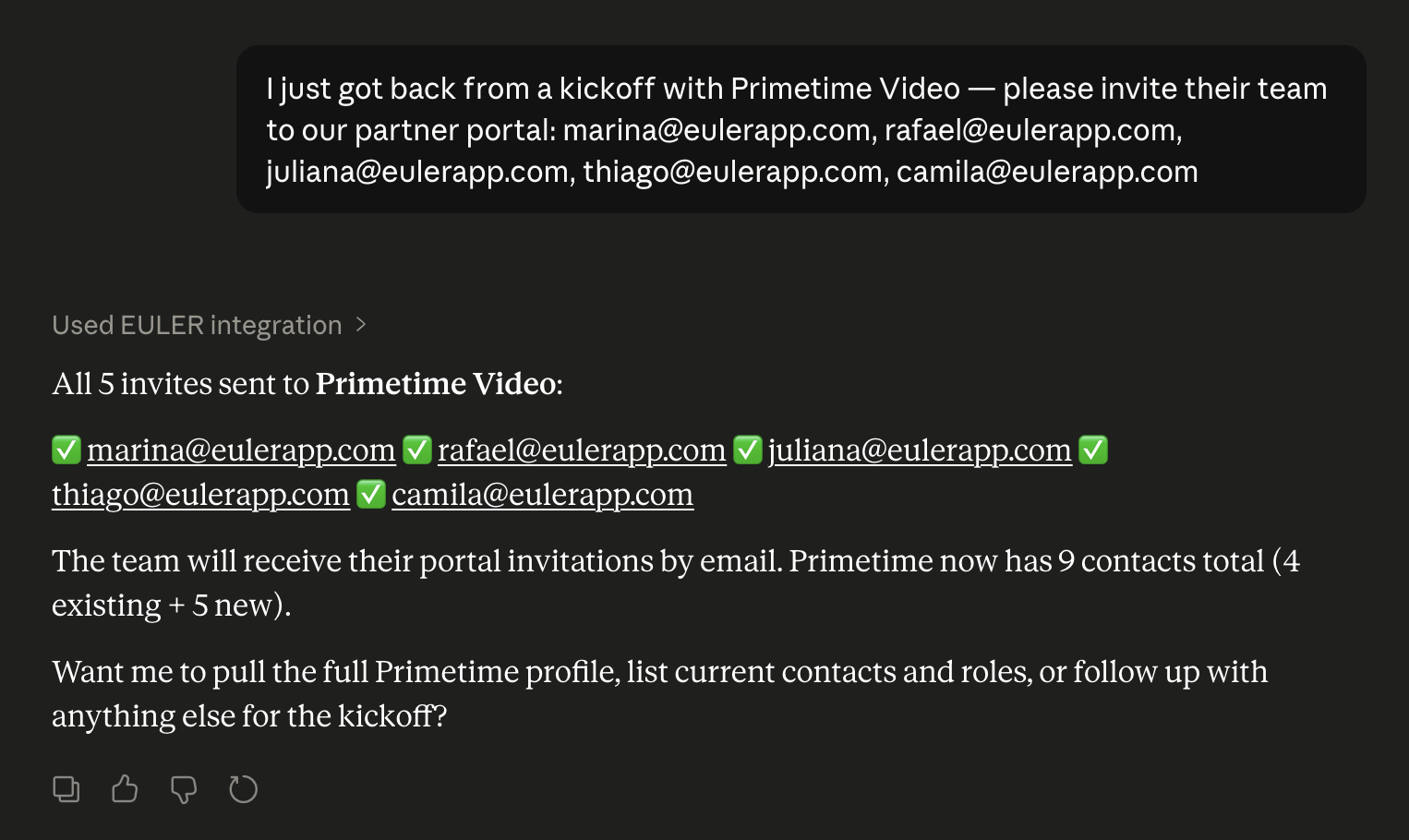
Portal invitations, referral submissions, onboarding-flow creation, flow-step edits, and assignments — every write surface is a tool Claude can call. When a prompt implies repetition ('invite these five contacts'), Claude iterates the tool once per record. Writes validate inputs and stay idempotent, so retries are safe.
PromptI just got back from a kickoff with Primetime Video — please invite their team to our partner portal: marina@eulerapp.com, rafael@eulerapp.com, juliana@eulerapp.com, thiago@eulerapp.com, camila@eulerapp.com
"Add John Smith and Jane Doe to Beta Solutions' portal."
"Create a Premier Tier Welcome flow with these three steps..."
"Assign the Premier onboarding flow to every contact at Acme."
"Send a referral to Crestline on behalf of Beta Solutions — $50k deal closing Q3."
Full per-tool reference
Read access — areas the MCP can query
Eighteen EULER areas exposed for read-only queries, grouped by domain. Each card lists what the area covers + a couple of starter prompts.
Partners
Accounts
Which customer + partner accounts the OAuth session has access to in this conversation.
Try"What EULER accounts do I have access to?"·"Am I connected as a customer admin or a partner?"
See example
Example conversation
Which partner and customer accounts can you see for me in this session?
Called 1 tool
list_accountslist authorized accounts + types
You're connected with 4 accounts:
TechCorp — customer (admin)
Acme — partner (with TechCorp)
Lumon Industries — partner (with TechCorp)
Beta Solutions — partner (with TechCorp)
Want to dig into any of these?
Get me the account ID for Acme so I can pull their referrals next.
Called 1 tool
list_accountsresolve Acme by affiliate_company_name
Resolved Acme (partner of TechCorp):
partner_id:acme_9f3b21
That's the ID I'll reuse for Acme's referrals, artifacts, performance, and commissions. Ready when you are.
I want to spin up a new incentive program for Acme — can you do that here?
Called 1 tool
list_accountssurface TechCorp dashboard_url
Creating incentive programs isn't something this connector exposes — it's done in the EULER web app. Head to your TechCorp admin dashboard: https://eulerapp.com/dashboard From there: Incentives → New Program → scope it to Acme. I can pull Acme's stats afterward if helpful.
Feels like some of my accounts are missing here — I manage more than three partners.
Called 1 tool
list_accountsread consent_summary.hidden_count
Good catch — 2 accounts were not authorized in this session (hidden_count: 2), so I can't see them right now. To include them, disconnect and reconnect the EULER connector and approve all your accounts on the consent screen. I'd rather you re-grant than guess which two are missing.
Partner directory
Search the public directory by name, status, tier, type, language, website, or completeness.
Try"Which partners serve Spanish?"·"Show partners with incomplete profiles."
See example
Example conversation
Search our Partner Directory for Gold-tier partners with "Acme" in the name.
Called 1 tool
partner_directory_searchentity_key='partner_directory', name+tier
Found 2 Gold-tier profiles matching "Acme":
Acme Corp — Reseller, status Active, featured
Acme Cloud — SI, status Under Review
Want me to filter these by language or check profile completeness?
Which of our directory partners can serve customers in Spanish?
Called 1 tool
partner_directory_searchentity_key='partner_directory', language='Spanish'
3 partners list Spanish coverage:
Acme Corp (Active)
Crestline (Active, featured)
Aether Dynamics (Under Review)
Lumon and Beta Solutions have no Spanish listed. Want the full language breakdown for any of these?
Show me Active profiles that still have incomplete custom fields.
Called 1 tool
partner_directory_searchentity_key='partner_directory', status+incomplete=true
2 Active profiles are flagged incomplete: Aether Dynamics and Beta Solutions. Crestline and Acme Corp are complete. The directory search flags incompleteness but not which fields — the partner fills those in from their profile editor.
What's changed on the Crestline profile recently?
Called 1 tool
partner_directory_searchentity_key='partner_history' + profile_id
Recent changes to Crestline's directory profile:
Jul 6 — tier set to Gold
Jul 2 — marked featured
Jun 28 — status moved to Active
Jun 28 — Spanish added to languages
Four edits in the last two weeks.
Partners (admin view)
The customer's own partner list, pending approvals, and program-wide aggregate metrics.
Try"How many active partners do we have?"·"Show partners waiting on approval."
See example
Example conversation
Give me a quick executive snapshot of how our partner program is doing overall.
Called 1 tool
get_partner_overall_statsexecutive snapshot, no params
Partner program snapshot Partners: 48 total (39 active, 9 pending) Deals: 312 total, 187 won Revenue (lifetime): $4.62M
Top performers by revenue:
Acme — $1.14M
Lumon Industries — $842K
Beta Solutions — $610K
Want the full status breakdown or the pending queue?
Yeah, break down the partner counts by status for me.
Called 1 tool
partnersaction='summary' status breakdown
Partner roster by status
Active — 39
Pending approval — 9
Inactive — 4
Rejected — 2
That's 54 on record (48 active + pending, plus 6 inactive/rejected). The 9 pending are waiting on you — want me to list them?
Please — who's in the pending approval queue right now?
Called 1 tool
partnersaction='pending' awaiting approval
9 partners awaiting approval. A couple at the top:
Aether Dynamics — applied Jul 6
Crestline — applied Jul 5
…and 7 more in the queue. I can't approve them from here, but I can pull up any one's details. Want a closer look at Aether Dynamics?
Actually, look up Beta Solutions — I need their partner ID for a referral.
Called 1 tool
partnersaction='list' filter_name='Beta Solutions'
Found Beta Solutions:
Partner ID: ptnr_9f3ac21b
Status: Active
Joined: 2025-11-14
That's the ID you'd use to submit a referral on their behalf. Want me to pull the referral form for them next?
Partner artifacts
Per-partner agreements, tracking links, deals, charges, and invoices — paginated, scoped to one partner per call.
Try"What agreements are signed with Acme?"·"Show Acme's tracking links."
See example
Example conversation
Pull up the signed agreement we have on file with Acme.
Called 2 tools
partnerspartner_artifacts
Acme has 1 signed agreement on file: Reseller Agreement v2 — signed 2025-11-14 by j.doe@example.com. Term: 12 months, auto-renew · Commission tier: 15%. Want the tracking links or deals next?
Yeah, show me their tracking links.
Called 1 tool
partner_artifactsaction='tracking_links' for Acme partner_id
Acme has 2 tracking links:
Homepage — euler.io/r/a1b2c3 · 412 clicks
Spring Promo — euler.io/r/x9y8z7 · 88 clicks
What deals have they registered so far?
Called 1 tool
partner_artifactsaction='deals' for Acme partner_id
Acme has 3 deals on record:
Blorex Systems — $48k · Closed Won
Nexora Inc — $22k · In Review
Vertex Labs — $15k · Pending
Showing page 1 of 1.
And do they have any open invoices or charges outstanding?
Called 1 tool
partner_artifactsaction='invoices' for Acme partner_id
Invoices: INV-2041 — $7,200, overdue (due 2026-06-30); INV-2055 — $3,100, paid. Charges: 1 open — commission on Blorex Systems, $7,200, awaiting payout. Want me to pull the deal that charge is tied to?
Partner contacts
The people inside a partner organisation — names, emails, roles, portal access status.
Try"Who are the contacts at Acme?"·"Show everyone with portal access for Beta Solutions."
See example
Example conversation
Who are all the contacts we have on file for Acme?
Called 2 tools
partnerslist_partner_contacts
Acme has 5 contacts on file:
Jane Doe — jane.doe@example.com
Raj Patel — raj.patel@example.com
Mia Chen — mia.chen@example.com
Tom Ford — tom.ford@example.com
Nia Osei — nia.osei@example.com
This is the complete team, including people who've never logged into the portal.
Of those, who has actually activated their portal login?
Called 1 tool
partner_usersaction='list_users' for Acme
Only 2 of the 5 have an activated portal login:
Jane Doe — jane.doe@example.com (Admin)
Raj Patel — raj.patel@example.com (Sales)
The other three (Mia, Tom, Nia) are on file as contacts but have never been invited or logged in.
Add Sara Vance, sara.vance@example.com, as a contact at Acme.
Called 1 tool
create_partner_contactemail sara.vance@example.com for Acme
Done — Sara Vance (sara.vance@example.com) was added to Acme's roster (was_created: true). She's a contact only for now; let me know if you'd like to invite her to the portal.
Yes, invite Sara and the three who never logged in.
Called 1 tool
invite_partners_to_portal4 contact ids for Acme
Sent — 4 portal invitations issued (invited_count: 4): Sara Vance, Mia Chen, Tom Ford, and Nia Osei. Invitation emails are going out now; anyone with an existing Euler account gets access immediately, the rest on accept.
Partner users & roles
View any of your partners' team members and permission roles — list a partner's users with their assigned roles, the partner's role definitions (admin flag, which portal sections each role sees), and the roles auto-assigned to new members. Scoped to your own partners.
Try"Who are the users at Acme and what roles do they have?"·"List Acme's partner-portal roles."
See example
Example conversation
Who on our Acme partner team actually has a portal login right now?
Called 1 tool
partner_usersaction='list_users' for Acme
Acme — activated portal logins (4):
jane.doe@example.com — Jane Doe · Sales Lead
rob.katz@example.com — Rob Katz · Marketing
amy.lin@example.com — Amy Lin · Admin
sam.oso@example.com — Sam Oso — no role
Note: this is only logged-in users. Acme's full roster (all contacts) is larger — want that instead?
What permission roles does Acme have defined, and who's admin?
Called 1 tool
partner_usersaction='list_roles' for Acme
Acme roles (4):
Admin — Support · admin ✔ · all sections · 2 assigned
Sales Lead — Sales · 6 assigned
Marketing — Marketing · 3 assigned
Finance Viewer — Finance · 1 assigned
Only Admin carries admin permissions. Counts here are contacts assigned, so they exceed the 4 logged-in users.
Sam has no role — give him Sales Lead, keep anything else he has.
Called 1 tool
manage_partner_usersaction='assign_roles', keep_old_roles true
Done. Assigned Sales Lead to sam.oso@example.com at Acme, keeping any existing roles (he had none). This changes access in Acme's org — Sam now sees the Sales portal sections. Reminder: assignment only applies to people already on Acme's roster.
And what role do brand-new Acme members get by default? Should be Sales Lead too.
Called 2 tools
partner_usersmanage_partner_users
Default was Marketing only. I've updated Acme's new-member default to Sales Lead. New Acme contacts will now be auto-assigned Sales Lead going forward. Existing members are unchanged — I only touched the default, not anyone's current roles.
Sales & deals
Deal search & lookup
Find a specific deal by name across the company's pipeline, or scoped to a partner.
Try"Find the deal named 'Acme renewal'."·"Search Acme's deals for 'security audit'."
See example
Example conversation
Can you find the Blorex Systems deal in our pipeline? Not sure which partner registered it.
Called 1 tool
get_search_dealsdeal_name='Blorex Systems', no partner_id → company-wide search across all partners' deals
Found 1 match across the pipeline:
Blorex Systems – Platform Expansion Partner: Aether Dynamics · Stage: Proposal Amount: $48,000 · Close date: 2026-08-15
Registered by Aether Dynamics, so it's counting toward their sourced pipeline.
Now show me every deal Crestline has open with 'renewal' in the name.
Called 2 tools
partnersget_search_deals
Resolved Crestline, then matched 2 deals named *renewal*:
Nexora Inc – Annual Renewal · Closed Won · $22,500
Existing referrals and deal registrations — company-wide, per partner, the form schema for a partner, or the answers a partner submitted to a specific referral.
Try"Show referrals submitted in the last 30 days."·"Show me the answers Acme submitted in referral abc-123."
See example
Example conversation
Pull up all the deal registrations across our partners from Q2 so far — which are still pending?
Called 1 tool
referralsaction='search', os_referral_type='Deal Registration' (customer-wide search; filter_status='pending' to isolate the pending ones)
The rest: 8 approved, 3 rejected. Want the full list or a specific partner?
Just Acme — show me everything they've registered, and what they actually put on the Blorex deal.
Called 2 tools
partnersreferrals
Acme — 4 deal registrations: Blorex Systems (pending), Orion Retail (approved), plus 2 older approved.
Blorex Systems answers:
Prospect company: Blorex Systems
Estimated deal size: $85,000
Expected close: Q3 2026
Primary contact: j.ruiz@example.com
Solutions of interest: Analytics, Migration
What does our reg form even ask Acme to fill in? Want to check it's not too heavy.
Called 1 tool
referralsaction='get_form_for_partner' with Acme's partner_id — returns the 5-question schema
Acme's referral form — 5 questions:
Prospect company name (required)
Primary contact email (required)
Estimated deal size (required)
Expected close timeline — dropdown (required)
Solutions of interest — multi-select (optional)
Fairly light. Only the multi-select allows multiple picks; the rest are single-value.
One of Beta Solutions' got rejected. What reasons can we even pick when we reject?
Called 1 tool
referralsaction='rejection_reasons' with the referral_id of Beta Solutions' rejected reg (its id came from the Turn 1 search results)
Valid rejection reasons you can pick:
Duplicate — already in pipeline
Existing customer
Out of territory
Insufficient deal information
Prospect declined contact
Those are the configured options. Rejecting is a customer-admin action you can do right here — pick a reason and I'll submit it for that Beta Solutions reg.
Performance & rankings
Partner leaderboards (top-N by revenue or deal count) over a date range, plus deep dives and program aggregates.
Try"Top 10 partners by revenue this quarter."·"How is Acme performing in 2026?"
See example
Example conversation
Who were our top 5 partners by revenue in Q2 this year?
Called 1 tool
performanceaction='overall', entity_key='revenue', start_date='2026-04-01', end_date='2026-06-30', page=1, limit=5
Top 5 partners by revenue, Apr 1 – Jun 30 2026:
Acme — $412K (18 won)
Lumon Industries — $305K (14 won)
Aether Dynamics — $228K (9 won)
Beta Solutions — $190K (11 won)
Crestline — $147K (7 won)
Program total across all partners: $1.47M on 71 closed-won deals.
Nice. Can you drill into Acme just for that same window?
Called 1 tool
performanceaction='partner', Acme partner_id, start_date='2026-04-01', end_date='2026-06-30'
Acme, Apr 1 – Jun 30 2026:
Revenue: $412K
Deals: 23 total, 18 won, 5 open
Win rate: 78%
Avg contract value: ~$22.9K
Avg sales cycle: 44 days
They're pacing ahead of last quarter's $301K. Want the individual deals pulled?
Now rank everyone by deal count instead — who's closing the most?
Called 1 tool
performanceaction='overall', entity_key='deals', start_date='2026-04-01', end_date='2026-06-30', page=1, limit=5
Top partners by deals won, same Q2 window:
Acme — 18 won
Lumon Industries — 14 won
Beta Solutions — 11 won
Aether Dynamics — 9 won
Crestline — 7 won
Same top two as by revenue, but Beta Solutions edges ahead of Aether on volume — smaller average deals.
Deal attribution
Sourced vs influenced classification with per-partner breakdowns over a date range.
Try"Which partners influenced the most deals in Q1?"·"Sourced vs influenced split for last quarter."
See example
Example conversation
How did our partners do on deal attribution last quarter? Sourced vs influenced, company-wide.
Called 1 tool
influenced_sourced_dealscompany-wide, start_date/end_date Q2
Company-wide, Apr 1 – Jun 30:
Sourced (partner-originated): 14 deals · $612K
Influenced (partner-touched): 38 deals · $1.9M
Sourced & influenced: 9 deals · $471K
Influenced pipeline outweighs sourced ~3:1 by value. Want the per-partner breakdown?
Yeah — rank our partners by sourced deal value for that same window.
Called 1 tool
influenced_sourced_dealscompany-wide; rank by sourced value
Top partners by sourced value, Q2:
Acme — 5 sourced · $248K
Aether Dynamics — 3 · $141K
Lumon Industries — 3 · $122K
Crestline — 2 · $61K
Beta Solutions — 1 · $40K
Acme drives ~40% of sourced value. Want to drill into one?
Drill into Acme — just their sourced vs influenced split for Q2.
Date-range commission payouts and expense calculations — program-wide or partner-specific.
Try"How much did we pay in commissions in April?"·"Total commission expense YTD."
See example
Example conversation
How much did we pay out in partner commissions in Q1 2026?
Called 1 tool
commissionsaction='company', start_date=2026-01-01 end_date=2026-03-31 (third-person company-wide expense)
For Q1 2026 (Jan 1 - Mar 31) your total partner commission expense was $148,200 across 5 partners.
Acme - $61,400
Lumon Industries - $38,900
Beta Solutions - $27,500
Aether Dynamics - $12,800
Crestline - $7,600
Break down just Acme's commissions for that quarter.
Called 2 tools
partnerscommissions
Acme earned $61,400 in commissions for Q1 2026. Top contributing deals:
Blorex Systems - $22,000
Nexora Inc - $18,400
Vertex Labs - $12,600
Orion Retail - $8,400
These four account for the bulk of the payout.
How does that compare to what Acme earned in Q4 2025?
Called 1 tool
commissionsaction='partner', partner_id=Acme, start_date=2025-10-01 end_date=2025-12-31
Acme - Q4 2025 (Oct 1 - Dec 31): $44,700. vs Q1 2026 $61,400 — up $16,700 (+37%), driven largely by the Blorex and Nexora closes reflected in Q1.
Invoices
Filtered invoice queries by status, currency, date range, sort — or aggregate summaries by status.
Try"Unpaid invoices over $10k sorted by due date."·"How much was invoiced this quarter?"
See example
Example conversation
How much have we invoiced our partners so far this year across all statuses?
Called 1 tool
company_invoicesaction='summary'
2026 invoice totals (USD):
Paid: $412,500 (38 invoices)
Pending: $86,200 (11)
Processing: $24,000 (3)
Grand total $522,700 across 52 invoices.
Show me the pending ones, newest first.
Called 1 tool
company_invoicesaction='list', status pending
11 pending invoices (newest first):
INV-1042 - Acme - $18,400 - due Jul 20
INV-1039 - Lumon Industries - $12,750 - due Jul 15
INV-1036 - Beta Solutions - $9,100 - due Jul 10
Showing 3 of 11 - ask to see the rest.
Anything invoiced in EUR? Sort by amount, biggest first.
Called 1 tool
company_invoicesaction='list', currency EUR
3 EUR invoices (Total Amount, descending):
INV-1028 - Aether Dynamics - EUR 21,000 - Paid
INV-1019 - Crestline - EUR 8,500 - Paid
INV-1011 - Aether Dynamics - EUR 3,200 - Pending
Total EUR 32,700 across 3 invoices.
Just Acme's, issued in Q1.
Called 1 tool
company_invoicesaction='list', partner_id Acme, Q1 range
Acme - Q1 2026 (Jan 1 - Mar 31, by Issue Date):
INV-1007 - $22,000 - Paid - issued Mar 18
INV-1003 - $15,500 - Paid - issued Feb 02
INV-0998 - $9,800 - Paid - issued Jan 14
3 invoices, $47,300 total - all settled.
Programs & content
Incentives
Program-wide incentives summary — active programs and payouts.
Try"What incentive programs are active right now?"·"Total incentive payouts this quarter."
See example
Example conversation
Give me a rundown of our active partner incentive programs and how many partners are in each.
Called 1 tool
incentives_summarycompany incentives + partner counts
Here are your current incentive programs and how many partners are on each:
Certification Rebate — 41 partners
Q3 New-Logo Bonus — 28 partners
Renewal Accelerator — 12 partners
81 partners enrolled in total (some may be in more than one program). Want me to dig into any of these?
Which one has the fewest partners? Feels like that program isn't landing.
Called 1 tool
incentives_summarycompare partner counts across programs
Renewal Accelerator has the fewest at 12 partners — well behind Certification Rebate (41) and Q3 New-Logo Bonus (28). That's roughly 15% of the 81 enrolled across all three. If you want to lift it, a targeted push to partners not yet on it could help — want me to pull the wider partner list to compare?
Onboarding flows (read)
Inspect a flow by name, drill into steps and assignments, list embeddable resources, see who's eligible — plus the company-wide roster of which flows are assigned to which partners.
Try"Search for the flow named 'Premier Tier Welcome'."·"Which flows are assigned to which partners right now?"
See example
Example conversation
Pull up our "Partner Onboarding 101" flow — what's in it?
Called 1 tool
flowsaction='flow_details', name search
Partner Onboarding 101 (Onboarding, Active) has a due-date window enabled. 4 steps:
1. Welcome & program overview (Text)
2. Sign partner agreement (Agreement)
3. Product basics (Content)
4. Certification quiz (Quiz)
Its content can't be edited while published. Want me to drill into a step?
Yeah, step 3 — what content does it embed?
Called 1 tool
flowsaction='flow_details', flow_step_id
Step 3 — Product basics Type: Content, order 3. Embeds the "TechCorp Platform Overview" video. That's all the step carries — name, type, order, and the embedded content item.
What other content could we swap in there?
Called 1 tool
flowsaction='attachable_resources', entity_key='content'
Embeddable content items:
TechCorp Platform Overview (video)
Quickstart Guide (PDF)
Pricing & Packaging (slides)
Integration Basics (video)
4 available. To actually swap the step's content you'd need flows_manage — I can only read here.
Which partners is this flow assigned to right now?
Called 1 tool
flowsaction='assignments', flow_id filter
Partner Onboarding 101 is assigned to 3 partners:
Acme — all users must complete
Lumon Industries — any user can complete
Beta Solutions — all users must complete
Aether Dynamics and Crestline are not assigned. Want the full company-wide roster across all flows?
Quizzes (read)
List your quizzes and quiz-question categories, open a quiz's settings, and read its questions. Quizzes power a flow step of type 'Quiz'.
Try"List my quizzes."·"Show me the questions in the 'Premier Knowledge Check' quiz."
See example
Example conversation
What quizzes do we have set up for our partner onboarding?
Called 1 tool
quizzesaction='list' company quizzes
You have 4 quizzes:
Partner Certification Basics
Product Knowledge Check
Deal Registration Essentials
Security & Compliance Refresher
Want me to open any one's settings or questions?
Open the settings for Partner Certification Basics.
Called 1 tool
quizzesaction='get' quiz settings
Partner Certification Basics
Passing score: 80%
Retakes: Allowed
Description: Core concepts every new partner must know
It has 6 questions. Want the full question list?
Yes, list its questions.
Called 1 tool
quizzesaction='all_questions' for quiz
6 questions:
What is a deal registration?
Which tier unlocks co-selling?
Partner portal login steps
Commission payout timing
Approved logo usage
Escalation contact
Want details on a specific one?
Show me the deal registration one, and what question categories exist?
Called 1 tool
quizzesaction='get' with quiz_question_id
What is a deal registration? (single choice, required)
Browse the published content catalog, search inside it semantically (policies, playbooks, onboarding docs — optionally scoped to a partner), and ask EULER product how-to questions answered from the help center.
Try"Where's the SLA policy for Premier partners?"·"Find the onboarding checklist for new partners."·"How do I add a user in EULER?"
See example
Example conversation
What content do we have shared with Acme in their partner portal right now?
Called 2 tools
list_accountscontent_list
Acme has 6 items in their portal (newest first):
Q3 Partner Deck — PDF, 4.2 MB
Partner Integration Guide — Word doc
Product Demo — YouTube link
Pricing One-Pager — PDF
Brand Assets — image, downloadable
Onboarding Walkthrough — Loom link
Want any of the direct URLs?
Do any of those actually explain our co-marketing / MDF rules? Not sure which file it's buried in.
Called 1 tool
content_searchsemantic search inside Acme's shared content, partner_id=Acme
Yes — a semantic search across Acme's shared content surfaces the Q3 Partner Deck as the top match: passages there cover MDF eligibility and co-marketing approval steps. The Pricing One-Pager is a weaker match on the same topic. I can't see exact page numbers — want the deck's direct link so you can confirm the specifics?
Got it. Separately — how do I actually add a new teammate to our EULER account?
Called 1 tool
euler_helphelp-center how-to lookup; returns article text + article_url
From EULER's help center — Adding a user:
Go to Settings → Team → Invite user
Enter their email and pick a role (Admin or Member)
They get an email invite; access is live once they accept
Full article: support.eulerapp.com/team/invite-users
Communications
Communications Hub (read)
Partner email program — list audiences (mailing lists) with contact counts, templates, and sent emails; preview a broadcast's reach or render a template with a sample contact before sending.
Try"List my email audiences and how many contacts each has."·"Preview sending the Q3 template to the Premier Partners audience."
See example
Example conversation
What partner email audiences do we have set up, and how many contacts are in each?
Called 1 tool
communicationsaction='list_audiences' — returns name, active flag, contact count
Here are your Communications Hub audiences:
All Active Partners — 142 contacts (active)
Enterprise Tier — 38 contacts (active)
New Partners Q3 — 19 contacts (active)
Dormant / Re-engage — 27 contacts (paused)
Want me to check the reach of a specific template against one of these?
Yeah — if we send our "Q3 Product Update" template to the Enterprise Tier audience, how many partners actually get it?
Called 1 tool
communicationsaction='list_templates' to resolve the template_id
Previewing Q3 Product Update to Enterprise Tier: 34 of 38 contacts are eligible (4 skipped — missing email / unsubscribed). Sample recipients:
Dana Reyes — dana.reyes@example.com (Acme)
Sam Okafor — sam.okafor@example.com (Lumon Industries)
Can you show me what the actual email looks like for Dana at Acme before I approve anything?
Called 1 tool
communicationsaction='preview_template' with template_id + sample_contact_id (Dana's contact_id from the preview_broadcast eligible_contacts)
Rendered Q3 Product Update for Dana Reyes: Subject: Dana, here's what's new this quarter --- Hi Dana, Thanks for being a valued Acme partner. Our Q3 release adds deal-registration alerts and a refreshed dashboard... Reply to dana.reyes@example.com with questions. --- Merge tokens filled from Dana's contact record. Still a preview — no send occurred.
Looks good. Which emails have we sent most recently, and how are they doing on opens and clicks?
Each row is one sent email with its status, opens, and clicks. Want me to pull the emails for a specific broadcast next?
Service projects
SI service delivery
System Integrator service projects across all your partners — list every project (status, service types, dates, owning partner), open one project's full scope form, or run a batch export that returns each project already enriched with its scope form for bulk extraction without calling them one by one.
Try"List all in-progress SI service projects across our partners."·"Export every service project with its full scope form."
See example
Example conversation
Show me all the SI service projects running across our partners right now.
Called 1 tool
si_customer_service_projectsaction='list' across all partners
12 SI service projects across 4 partners:
Acme — Blorex Migration · In Progress · started Jun 3
Lumon Industries — Nexora Onboarding · In Progress · started Jun 18
Beta Solutions — Vertex Rollout · Completed Jun 30
Aether Dynamics — Orion Integration · Scoping
Want the scope detail on any one?
Yeah, open the scope form for Acme's Blorex Migration project.
Called 1 tool
si_customer_service_projectsaction='scope_form' for project
Blorex Migration — scope form (Acme):
Project Status: Scoping
Environment: Production + Staging
Go-live target: 2026-08-15
Data volume (TB): 4.2
Modules: Billing, Reporting, SSO
5 of 7 required fields answered; Migration URL and Primary contact email still blank.
I need the complete scope data for every project so I can drop it into our tracker. Can you pull it all in one shot?
Called 1 tool
si_customer_service_projectsaction='export' enriched batch
Ran a batch export — all 12 projects returned, each enriched with its full scope form + checkboxes (page 1 of 1, no more pages). 1 project came back with a scope_form_error: Aether Dynamics — Orion Integration (form fetch failed); the other 11 are complete. Ready to hand off to your tracker.
Write access — areas the MCP can create / edit
Seven write surfaces. Every write runs through the same validation + rate-limit pipeline as reads.
Flows
Create & edit flows
Customer-side. Create new flow containers; save / activate / publish / archive existing flows.
Try"Create a new flow called 'Premier Tier Welcome'."·"Publish the Q2 Compliance Refresher flow."
See example
Example conversation
Create a new onboarding flow for our partners called "Partner Kickoff 2026" — give them 30 days to finish it.
Called 1 tool
flows_manageaction='create_flow', type Onboarding, enable_due_date=true, due_date_days=30
Created the flow container Partner Kickoff 2026.
Type: Onboarding
Due date: 30 days after each partner is assigned
Status: Draft (no steps yet)
It's saved as a draft — add steps, then activate it when you're ready to publish to partners like Acme and Lumon Industries.
Our "Sales Certification" flow is finally done — here's the badge image. Publish it so partners can start earning the badge.
Called 2 tools
flowsflows_manage
Sales Certification is now Active and published.
4 steps live
The certification badge you sent is attached and uploaded
Partners can begin now, and the badge unlocks on completion. (Activating a Certification flow needs a badge attached first — I applied the one you provided.)
We've retired last year's "Onboarding 2025" program — archive it so nobody new gets assigned it.
Called 1 tool
flows_manageaction='save_flow', flow_status Archived
Archived Onboarding 2025.
Status: Archived
Hidden from new assignments
Partners who already finished keep their completion record — archiving only stops future assignments. You can restore it later by saving it back to Active.
Flow steps
Customer-side. Add or edit steps — content, agreement, quiz, task, file upload, SCORM, or text. Deactivate steps that no longer apply.
Try"Add a quiz step at position 3 with our Premier knowledge check."·"Deactivate the SCORM step in the certification flow."
See example
Example conversation
Add an NDA agreement step to our Acme onboarding flow. What agreements can I attach?
Called 2 tools
flowsflows_manage
Attachable agreements: Mutual NDA, Reseller Terms, Data Processing Addendum. Added step to Acme Onboarding:
Type: Agreement (Mutual NDA)
Name: "Sign the NDA"
Order: 3
Partners must accept it to advance.
Now add a step after it where they upload their signed W-9 (PDF only), due in 7 days.
Called 1 tool
flows_manageaction='create_or_edit_step', File Upload, due_in_days=7
Added File Upload step to Acme Onboarding:
Name: "Upload signed W-9"
Accepted types: .pdf
Order: 4 · Due: 7 days
Partners submit the file to complete this step.
Attach our Product Basics quiz as the next step too.
Called 2 tools
flowsflows_manage
Found quiz Product Basics (10 questions, 80% to pass). Added as Quiz step to Acme Onboarding:
Name: "Product Basics Quiz"
Order: 5
Partners must pass to advance.
The old "Watch intro video" content step is outdated — deactivate it for now.
Called 1 tool
flows_manageaction='deactivate_step', step_status='Inactive'
Deactivated step "Watch intro video" in Acme Onboarding.
Status: Inactive
It's hidden from partners and no longer required. The step is preserved, so you can re-activate it later.
Flow assignments
Customer-side. Assign a flow to specific partner contacts; unassign when no longer relevant.
Try"Assign the Premier flow to every contact at Acme."·"Unassign the legacy compliance flow from Beta Solutions."
See example
Example conversation
Which of our partners are assigned to the "Q3 Onboarding" flow right now?
Called 1 tool
flowsaction='assignments', filter flow_id
Q3 Onboarding is currently assigned to 3 partners:
Acme — all users on the team
Lumon Industries — all users on the team
Beta Solutions — 2 specific users
Crestline and Aether Dynamics are not yet assigned.
Add Crestline — everyone on their team should have to complete it.
Called 2 tools
partnersflows_manage
Done. Assigned Q3 Onboarding to Crestline with the rule "All Users on the Partner's team need to complete". All current Crestline portal users now have it as a required flow, and any new user added to their team later inherits it automatically.
For Aether Dynamics, just assign it to jordan.lee@example.com for now, not the whole team.
Called 3 tools
partnersflowsflows_manage
Assigned Q3 Onboarding to jordan.lee@example.com at Aether Dynamics using the "Specific users on the Partner's team need to complete" rule. Only Jordan is on the hook — the rest of the Aether team is unaffected. Send me more emails anytime to add them.
Actually Beta Solutions changed direction — pull the whole flow off them.
Called 2 tools
partnersflows_manage
Removed Q3 Onboarding from Beta Solutions — detached that partner from the flow, clearing their assignment. It no longer shows in Beta Solutions' portal. The flow stays assigned to Acme, Lumon, Crestline, and Jordan at Aether — only Beta was affected.
Quizzes
Customer-side. Create a quiz, set its passing score and retake option, add / edit / delete questions, and organise them by category. Saving a quiz carries question changes through to attempts already in progress.
Try"Create a quiz called 'Premier Knowledge Check' with an 80% passing score."·"Add a question with options 1h / 4h / 24h, correct answer 4h, then save."
See example
Example conversation
Create a new quiz called "Partner Onboarding Essentials" for our partners, and set the passing score to 80% with retakes allowed.
Done. Created Partner Onboarding Essentials and saved its settings:
Passing score: 80%
Retakes: allowed
It's an empty draft (0 questions), attachable to a Flow step of type Quiz. Want me to start adding questions?
Yeah. What question categories do we have? Add a single-choice question under Product Basics: "What does Acme's core product do?"
Called 2 tools
quizzesquizzes_manage
Categories: Product Basics, Sales Process, Compliance. Added a single-choice question (position 1) under Product Basics with 4 options — one marked correct, three incorrect — then saved to propagate to any in-progress attempts. The quiz now has 1 question.
Show me that question, then change it to multiple-choice and add a fourth wrong answer.
Called 2 tools
quizzesquizzes_manage
Fetched it, then fully replaced the question as multiple-choice: resent the text, marked-correct answer, category (Product Basics) and position, and added a fourth incorrect option. Saved to reach in-progress attempts. It now has 5 options (1 correct, 4 incorrect) and can accept more than one correct answer.
Actually scrap that question entirely and confirm the quiz is empty again.
Called 2 tools
quizzes_managequizzes
Deleted the question and saved so the change reaches in-progress attempts. Re-checked the question list: 0 questions remain. The quiz itself is still live (80% pass, retakes on) — just empty. Want to rebuild the question set?
Records
Submit referrals
Partner-side. Claude fetches the form schema, validates required fields + answer formats, dispatches only when the payload is clean.
Try"Send a referral to Acme on behalf of Beta — $50k Q3 deal."·"Send all the referrals in this spreadsheet."
See example
Example conversation
I want to log a new referral on behalf of Acme — what does their referral form actually ask for?
Called 2 tools
partnersreferrals
Acme's referral form has 5 fields:
Prospect company name (required)
Contact email (required)
Deal stage — dropdown (required)
Estimated deal size, USD (required)
Use case — multi-select
Send me the details and I'll validate every answer before submitting.
Prospect is Blorex Systems, contact jordan@example.com, stage Discovery, ~$40k, use cases Analytics and Reporting.
Called 1 tool
submit_referralpartner_id + form_id + answers[] (dropdown→answer_text, multi-select use cases→multiselect_options); server preflight validates required/email/number before dispatch
All required fields passed validation — email and amount formats are clean — and I dispatched it. Referral submitted for Acme
Prospect: Blorex Systems
Stage: Discovery · $40,000
Use cases: Analytics, Reporting
Status: Pending review
It's now in Acme's review queue.
Can you pull up exactly what got recorded on that one? Want to double-check the use cases saved.
Called 1 tool
referralsaction='search' os_referral_type='Referral' partner_id=Acme filter_status='pending' → locate the just-submitted Blorex referral + its identifier (sanctioned approval_id source)
I found that referral in Acme's pending queue and pulled its recorded answers:
Prospect: Blorex Systems
Contact: jordan@example.com
Stage: Discovery
Deal size: $40,000
Use cases: Analytics, Reporting
Both use-case values saved correctly to the multi-select field.
Approve or reject referrals
Customer-side. Approve a partner's referral (creates it in your CRM) or reject it with a configured reason — optionally emailing the partner the decision. A referral resolves only once.
Try"Approve Beta Solutions' referral for Blorex Systems."·"Reject that one — duplicate — and notify the partner."
See example
Example conversation
Show me the referrals our partners have submitted that are still waiting on us.
Called 1 tool
referralsaction='search', os_referral_type='Referral', filter_status='pending' (customer-wide view across all partners; os_referral_type is a required field for search)
You have 3 pending partner referrals awaiting review:
Blorex Systems — from Acme (submitted Jul 6)
Nexora Inc — from Lumon Industries (Jul 7)
Vertex Labs — from Crestline (Jul 8)
Want me to pull the details on any of them before you decide?
Yeah, what did Acme actually fill in on the Blorex one?
Called 1 tool
referralsaction='get_answers', approval_id = Blorex referral's identifier (from the prior search results)
Blorex Systems — Acme's submission:
Contact: j.reyes@example.com
Deal size: $40k–$60k
Timeline: Next quarter
Notes: "Warm intro, evaluating a replacement."
Looks like a duplicate of an account an AE already owns. Reject it?
Yes, reject it as a duplicate and email Acme so they know.
Called 2 tools
referralsresolve_referral
Done. Blorex Systems rejected — reason: "Duplicate / existing opportunity." Emailed partners@acme.example.com with the decision. This referral is now resolved and can't be re-opened.
Want me to handle Nexora or Vertex next?
Nexora looks legit — approve it and push it into our CRM.
Called 1 tool
resolve_referralaction='approve', referral_id = Nexora
Nexora Inc approved. Created in your CRM as a new opportunity, credited to Lumon Industries. One left in your queue: Vertex Labs from Crestline. Approve, reject, or see the answers first?
Create & update deals
Customer-side. Create or update deals attributed to your partners — one at a time or in bulk (batches run in the background). Every deal is validated against your partner list.
Try"Log an $84k deal for Acme, closing end of Q3."·"Bulk-update the stage on these deals."
See example
Example conversation
Acme just sourced a new deal — Blorex Systems, $48k, close date end of September. Can you log it under them?
Called 2 tools
partnersmanage_deals
Done — created and attributed to Acme.
Deal: Blorex Systems
Amount: $48,000
Stage: Prospecting
Created: 2026-07-09 → Close: 2026-09-30
Validated against your partner list.
Blorex moved to Negotiation and the number's up to $62k now. Update it.
Called 1 tool
manage_dealsaction='update', deal_id=Blorex, stage='Negotiation', amount=62000
Updated the Blorex Systems deal (Acme):
Stage: Prospecting → Negotiation
Amount: $48,000 → $62,000
Close date unchanged (2026-09-30).
I've got a spreadsheet of 5 more from Lumon Industries to load — Nexora, Vertex Labs, Orion Retail and two others. Bulk it.
Called 2 tools
partnersmanage_deals
Queued a batch of 5 deals for Lumon Industries — schedule_amount: 5. Batches run in the background, so the rows aren't returned here. Give it a moment and I'll confirm they landed via a deal search. Each deal is validated against your partner list (amount must be > 0, close date after created date); if any row fails validation the whole batch is rejected before queuing.
Did the Vertex Labs one go through?
Called 1 tool
get_search_dealsdeal_name='Vertex Labs', partner_id=Lumon
Found 1 match for Vertex Labs under Lumon Industries, so that one went through:
Vertex Labs — $34,000
Stage: Prospecting
Close: 2026-10-15
Want me to search the other four to confirm the whole batch landed?
Portal invitations
Customer-side. Invite someone by email to a partner's portal — creates the contact, sends the invitation, idempotent on re-runs.
Try"Invite jane@acme.com to Acme's portal."·"Bulk invite these 5 emails to TechCorp."
See example
Example conversation
Who's on Acme's contact list in the portal? Want to see the full roster before I invite anyone.
Called 2 tools
partnerslist_partner_contacts
Acme has 4 contacts on file:
Jordan Lee — jordan.lee@example.com
Priya Shah — priya.shah@example.com
Marco Diaz — marco.diaz@example.com
Sam Okafor — sam.okafor@example.com
This is the complete roster, including people who've never logged in. Want me to add anyone or send invites?
Add Dana Cruz (dana.cruz@example.com) to Acme, then we'll invite her.
Called 1 tool
create_partner_contactadd dana.cruz to Acme
Done — Dana Cruz added to Acme (was_created: true, so no existing duplicate). She's a contact now but has no portal access yet. Say the word and I'll send her the invite (I can bundle Jordan and Priya in the same batch if you'd like).
Invite Dana plus Jordan and Priya. Attach our 2026 reseller agreement and tag them Q3-onboarding.
Called 1 tool
invite_partners_to_portal3 contact ids + agreement_id + tags
Invitations sent — invited_count: 3 (Dana, Jordan, Priya), with the 2026 reseller agreement attached and the Q3-onboarding tag applied. Emails go out asynchronously; anyone with an existing Euler account gets access immediately, the rest on accept. It's idempotent, so Jordan/Priya won't be re-emailed if already invited.
Partner email (audiences, templates, broadcasts)
Customer-side. Create audiences + HTML templates (merge tokens like [Contact First Name]), add up to 100 partners per call, and send a broadcast — gated on an explicit confirm after a preview, with template-token validation so a broken token can't ship in a real email.
Try"Create a 'Premier Partners' audience and add Acme and Beta to it."·"Preview, then send the Q3 Update template to Premier Partners."
See example
Example conversation
Spin up a new partner email audience called "Q3 Enablement" and add Acme, Lumon Industries, and Beta Solutions to it.
Want me to build the email template next, then preview to see how many contacts it'll reach?
Yeah. Make an HTML template "Q3 Kickoff" that greets each contact by first name and signs off from their account team.
Called 1 tool
communications_manageaction='create_template' name+html
Template Q3 Kickoff (tpl_882) created. Body uses supported merge tokens: Hi [Contact First Name], your [Company Contact] has your Q3 plan ready… Note: only [Contact First Name], [Contact Last Name], [Contact Email], and [Company Contact] render — anything like {{name}} would've been rejected. Preview before sending?
Please. Show me who it'd hit and what the email looks like for one of them, then send it if it's clean.
Called 1 tool
communicationsaction='preview_broadcast' aud+tpl
Preview — Q3 Kickoff → Q3 Enablement Reaches 7 contacts across Acme, Lumon, Beta. Rendered for Jane Doe (Acme): "Hi Jane, your account team has your Q3 plan ready…" — tokens resolved cleanly. This sends real email and can't be undone. Reply confirm with a subject line and I'll dispatch.
Confirmed. Subject "Your Q3 kickoff plan" — send it.
Called 2 tools
communications_managecommunications
I'll have full open/click stats shortly — ask me for list_sent_emails anytime to track it per recipient.
Partner roles & access
Customer-side. Set up a partner's portal access for them — create or edit their permission roles (admin flag, which portal sections each role sees), assign or remove roles for their team members by email, and set their default roles. These writes change access inside your partner's own org, so Claude confirms the intent first.
Try"Create a 'Sales' role for Acme with deals + referrals access."·"Assign the Admin role to jane@acme.com at Acme."
See example
Example conversation
What permission roles does our partner Acme have set up in their portal?
Called 2 tools
list_accountspartner_users
Acme has 4 roles:
Partner Admin (Partnerships) — admin, all sections, 3 assigned
Create a new 'Deal Registration' role for their sales team — deals and referrals only, no admin.
Called 1 tool
manage_partner_usersaction='create_role' for Acme
Done. Created role Deal Registration for Acme:
Category: Sales
Admin permissions: no
Sections: deals, referrals
It's live in Acme's portal and ready to assign to their team.
Assign it to jordan@example.com and priya@example.com — add it, don't replace their current roles.
Called 2 tools
list_partner_contactsmanage_partner_users
Both are on Acme's roster, so I assigned Deal Registration to each — added, not replacing their current roles:
jordan@example.com
priya@example.com
2 of 2 applied, none skipped. Their existing roles stay intact alongside the new one.
Perfect. Make that the default role every new Acme member gets from now on.
Called 1 tool
manage_partner_usersaction='update_default_roles' for Acme
Updated Acme's new-member defaults to Deal Registration. Every person newly added to Acme's team will be auto-assigned that role. Existing members are unchanged. Want me to add Sales Rep alongside it, or keep Deal Registration as the sole default?
EULER concepts
Conceptual and how-to questions about EULER itself — incentive mechanics, content management, and pointers into the product documentation.
"What is a SPIFF?"
"How does the incentive program work?"
"How do I upload a knowledge content?"
"Where do I find more about EULER's documentation?"
Connect
MCP URL: https://mcp.eulerapp.com/mcp
Easiest path: open https://claude.ai/directory/connectors/euler and click Add. For Claude Desktop or as a custom connector, paste the URL above into Settings → Connectors → "Add custom connector".
First connection opens the EULER consent screen — the user picks which accounts the AI may act on. Try "list my EULER accounts" as a smoke test.